ASO PostgreSQL version overrides and in-place upgrades
Notice: This content was AI assisted. Get in touch with the author if you’re unsure.
This guide explains how ASO manages PostgreSQL through Flux and how a team updates its engine version in its existing patch while inheriting the shared resource and API. The examples below follow Adoption and RPE preview in CFT. As this is largely utilised in preview, we will be glossing over downtime/CR and precautions which would naturally be required if executing on prod. Prod postgres servers are not built with Flux so these instructions are not valid (please see the Terraform instructions).
Development teams: jump to Quick upgrade for the example change, screenshots and commands. The background and full implementation guidance follow below.
Prerequisites
- Access to the relevant Flux repository and the correct Azure server.
- Platform Operations confirm that the target cluster’s ASO release and CRDs support the selected resource API and intended upgrade.
- A supported PostgreSQL upgrade path, application and extension compatibility checks, and a non-production test before rollout.
Quick upgrade
Update spec.version in your team’s existing environment-specific PostgreSQL
patch. Keep its apiVersion aligned with the shared server resource.
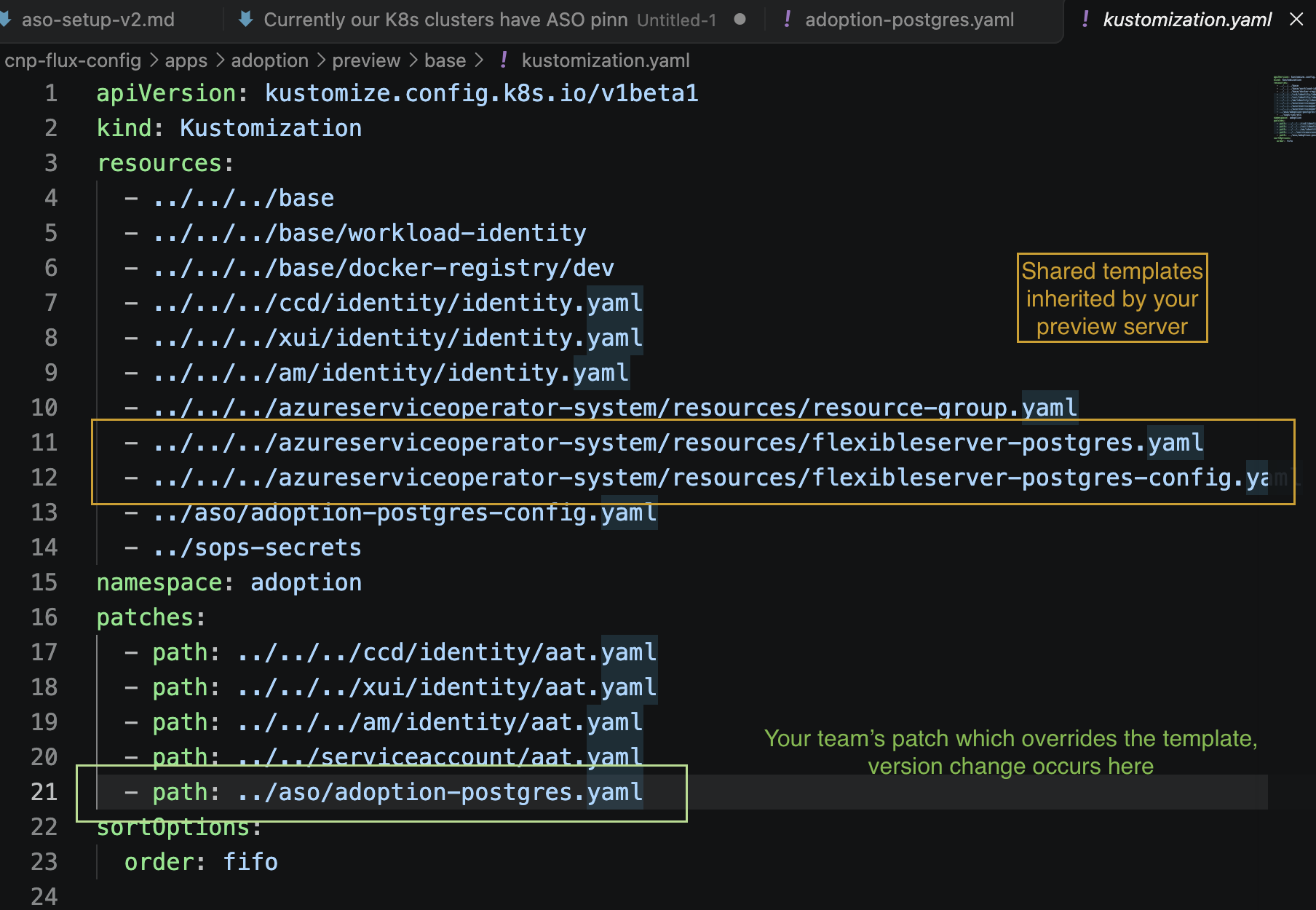
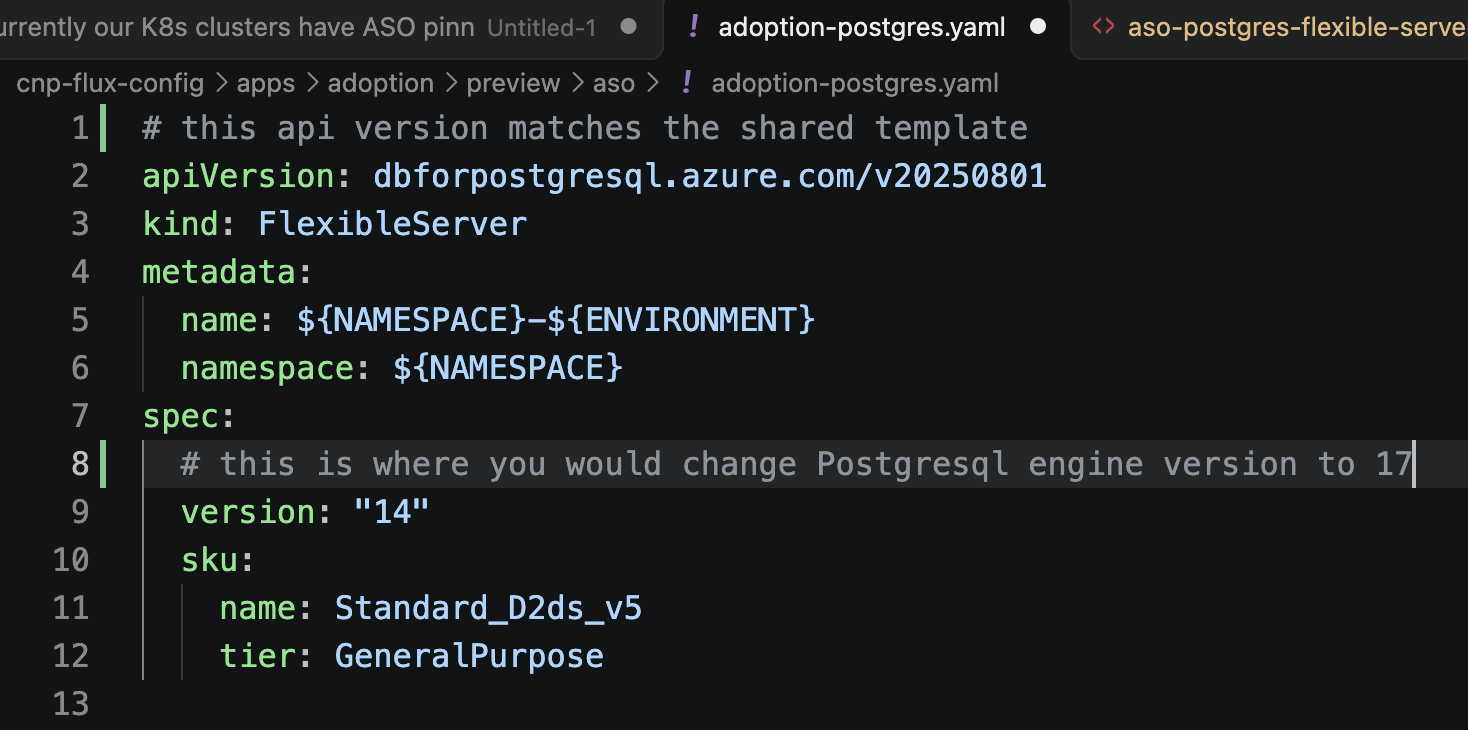
This kustomization.yaml shows all the manifests which will be combined to build the postgresql server - Adoption preview Kustomization This is the team specific customisation which makes each server different from the shared template - Adoption PostgreSQL patch This change causes the server version to be upgraded - Example CNP change
Replace adoption with your team’s namespace when applying the command to
another service.
The screenshots show where the shared resource is imported and where to change the engine version in the existing team patch:
Optional Baseline -
After checking out your Flux repository, render the environment overlay from the repository root. Confirm the final (target) server has the expected API and target engine version before raising the change:
kubectl kustomize apps/adoption/preview/base --load-restrictor LoadRestrictionsNone
Rollback is not possible, make a PITR backup if you are unsure.
Make version change on your team’s patch yaml. The patch’s filename must be present on your kustomize under the section ‘patches’
PR and Merge to master After committing and merging your version change, you can follow the Flux and server checks in Monitor the Flux and ASO upgrade.
After the server shows ‘Ready’ on the Azure portal, validation may begin. Quickstart instructions end here.
Understanding ASO and shared resources (theory)
From Flux to Azure
Flux reconciles repository configuration into each AKS cluster. Azure Service
Operator (ASO) runs in the cluster and uses Kubernetes custom resources to manage
Azure infrastructure. A FlexibleServer resource describes an Azure PostgreSQL
server; the database itself runs in Azure, not in an AKS pod.
Flux repository
  -> Kustomize combines shared resources and team patches
  -> Flux substitutes environment values and applies the manifests to AKS
  -> ASO reconciles the resources into Azure
CFT uses hmcts/cnp-flux-config; SDS uses hmcts/sds-flux-config. The examples here are CFT paths relative to the repository root. Check the equivalent configuration before applying this pattern in SDS.
Three different versions
| Setting | What it controls |
|---|---|
ASO release, for example v2.17.0
|
The controller and CRDs available in the cluster, including supported resource APIs. |
apiVersion, for example dbforpostgresql.azure.com/v20250801
|
The resource schema and Azure management API used by ASO. This example corresponds to Azure API 2025-08-01. |
spec.version, for example "17"
|
The requested PostgreSQL engine major version. |
An ASO or API bump alone does not select a newer PostgreSQL engine.
Changing spec.version on an existing server is a database upgrade request.
Platform Operations manages ASO compatibility and shared defaults. Development teams manage their server overrides and verify application compatibility. The ASO release is configured in apps/azureserviceoperator-system/aso/kustomization.yaml; confirm the deployed controller and CRDs are ready before using a new API.
Shared template, team-specific server
The shared PostgreSQL manifest is a reusable Kustomize resource, not a single database shared by all teams. Each consuming application renders its own server. Team patches override only the fields they specify; all other settings are inherited.
| Layer | Example | Purpose |
|---|---|---|
| Shared server | apps/azureserviceoperator-system/resources/flexibleserver-postgres.yaml | Defaults for API, engine, SKU, storage, networking and ownership. |
| Team patch | apps/adoption/preview/aso/adoption-postgres.yaml | Matches the shared server API and sets team-specific overrides, including the engine version. |
| Environment Kustomization | apps/adoption/preview/base/kustomization.yaml | Imports shared resources and applies the existing team patch. |
The shared server and team patches use
dbforpostgresql.azure.com/v20250801. The team patch overrides the inherited
engine version for that team’s server. For example, Adoption’s patch currently
specifies "14"; a planned upgrade changes that existing field to the approved
target, such as "17". The API version remains aligned with the shared
resource.
The shared engine default is currently "17", independently of its 2025 API.
Do not confuse an API year with an engine version. A consumer without an engine
override inherits the shared default, so changing shared defaults can affect
other teams and existing servers.
How-to steps
1. Identify the server and upgrade scope
Follow the application’s Flux path to its environment Kustomization. RPE uses
apps/rpe/base/kustomize.yaml
to select apps/rpe/${ENVIRONMENT}/base.
Confirm the current engine version in Azure or through a database connection:
SHOW server_version;
Compare the running version with the existing team patch and shared defaults. Review Microsoft’s major-version upgrade guidance for supported targets and pre-upgrade requirements.
2. Update the version in the existing team patch
Edit the existing team patch referenced by the environment Kustomization. Keep
its apiVersion, kind and resource identity aligned with the shared server.
Change only spec.version for an individual team’s engine upgrade:
apiVersion: dbforpostgresql.azure.com/v20250801
kind: FlexibleServer
metadata:
  name: ${NAMESPACE}-${ENVIRONMENT}
  namespace: ${NAMESPACE}
spec:
  version: "17"
Confirm that the environment Kustomization already references the team patch, and that the chosen engine version is supported. (v2025 supports up to postgresql v18)
3. Validate and roll out
From the Flux repository root, lint the changed team patch and render its environment overlay. For Adoption preview:
yamllint -c .yamllint.yaml \
  apps/adoption/preview/base/kustomization.yaml \
  apps/adoption/preview/aso/adoption-postgres.yaml

kubectl kustomize apps/adoption/preview/base --load-restrictor LoadRestrictionsNone
The repository-wide lint command is ./tests/lint-yaml.sh. CI also runs
Flux dry-runs and schema validation through
tests/dry-run-kustomize.sh.
Check the rendered server has:
- The existing API
dbforpostgresql.azure.com/v20250801and the intendedspec.version. - The original name, namespace, owner, networking and other server settings.
- No unintended changes to other servers or server configuration resources.
A local Kustomize build does not perform Flux substitutions or prove a successful Azure upgrade. Confirm the rendered version and CI results as well.
Raise a pull request. Merge an environment’s version change only when ready for Flux and ASO to reconcile it.
4. Monitor the Flux and ASO upgrade
(If you have arrived here from the Quickstart, replace ‘rpe’ with your app)
Check that the current context is the intended cluster, then confirm the RPE Kustomization is ready and see which source revision it applied:
kubectl config current-context
flux get kustomizations -A | grep rpe
kubectl get kustomization rpe -n flux-system \
  -o jsonpath='{.spec.path}{"\n"}{.status.lastAppliedRevision}{"\n"}'
If the application is deployed through Helm, check its HelmReleases as well. This is separate from checking whether ASO has completed the database upgrade.
flux get helmreleases -A
List the PostgreSQL resources in the namespace and describe the server:
kubectl get flexibleservers -n rpe
kubectl describe flexibleserver rpe-preview -n rpe
For the server’s desired and Azure-reported versions and reconciliation state, use query
kubectl get flexibleserver rpe-preview -n rpe \
  -o jsonpath='API: {.apiVersion}{"\n"}Desired version: {.spec.version}{"\n"}Azure-reported version: {.status.version}{"\n"}Ready: {.status.conditions[?(@.type=="Ready")].status}{"\n"}Reason: {.status.conditions[?(@.type=="Ready")].reason}{"\n"}Message: {.status.conditions[?(@.type=="Ready")].message}{"\n"}Generation: {.metadata.generation}{"\n"}Observed generation: {.status.conditions[?(@.type=="Ready")].observedGeneration}{"\n"}'
To save the full resource for local troubleshooting, use either command:
kubectl get flexibleserver rpe-preview -n rpe -o yaml
kubectl describe flexibleserver rpe-preview -n rpe > out.txt
While the upgrade runs, the desired version may be "17" while the
Azure-reported status.version remains "14". A Ready=False condition with
reason Reconciling and a message that the resource is being reconciled means
ASO is still processing the Azure operation. Wait and check again; do not start
a second upgrade. Completion is indicated when the resource is Ready and the
reported version is "17". Confirm the database version with
SHOW server_version; as well.
If reconciliation reports failure, inspect the Kustomization and ASO controller events/logs before taking action:
kubectl describe kustomization rpe -n flux-system
kubectl logs -n azureserviceoperator-system \
  deploy/azureserviceoperator-controller-manager --since=30m \
  | grep -i rpe-preview
Avoid sharing a full FlexibleServer YAML dump outside approved channels: the
serviceoperator.azure.com/poller-resume-token annotation can contain
long-lived-looking Azure operation URLs and signed poller data. Prefer the
focused JSONPath command above, which omits that annotation. Full YAML and
kubectl describe output may include it; inspect saved output locally and redact
the annotation before sharing.
Verification
- Flux and ASO reconcile successfully, with no outstanding server error.
- Azure reports the expected server ready on the target engine version.
SHOW server_version;confirms the running PostgreSQL major version.- The endpoint is unchanged and expected databases and data are present.
- Application connections, read/write smoke tests and background jobs work.
- The owning team checks application errors, performance and alerts.
A supported, successful in-place upgrade retains the server and its databases. Rendering the expected manifest alone is not evidence that an upgrade completed.
Troubleshooting and recovery
| Symptom | Action |
|---|---|
| Kustomize cannot find the existing patch target | Check that the team patch’s API, kind, name and namespace match the shared resource. |
| The rendered engine version is wrong | Check spec.version in the team patch and whether the environment Kustomization references it. If the field is omitted, the shared default is inherited. |
| Kubernetes does not recognise the target API | Ask Platform Operations to check the deployed ASO release and served CRDs. |
| Azure upgrade or ASO reconciliation fails | Capture resource conditions and the Azure error. Resolve the reported prerequisite; do not delete and recreate the server to clear the error. |
| The application fails after an upgrade | Escalate with application errors and the running database version. Use the agreed recovery plan, not a version decrement in Git. |
A completed major-version upgrade cannot be downgraded in place. Recovery may require restoring a pre-upgrade backup to a separate server and coordinating an application cutover with Platform Operations.
Additional Information
- Example CNP Flux implementation commit
- ASO PostgreSQL 2025 API reference
- Azure PostgreSQL major-version upgrades
- Connecting to Flexible Server