How Jenkins agents work
Jenkins is configured to spin up agents to run pipelines.
These agents can be virtual machines or kubernetes pods.
There are various agent templates that are used to define the specs and configuration of the agents that are spun up.
Agent templates are defined here:
Creating new agent templates
These templates are managed via code in sds-flux-config and cnp-flux-config repositories as shown above.
To create a new agent template, you can copy an existing one from files listed above and modify it as required.
Example agent template config:
- templateName: "cnp-jenkins-builders-sbox"
  templateDesc: "Jenkins build agents for CFT sandbox environment"
  labels: "ubuntu-sbox"
  maxVirtualMachinesLimit: 10
  usageMode: "EXCLUSIVE"
  virtualMachineSize: "Standard_D4ds_v5"
  imageReference:
    galleryImageDefinition: "jenkins-ubuntu-v2"
    galleryImageVersion: "<version>"
    galleryName: "hmcts"
    galleryResourceGroup: "<resource-group>"
    gallerySubscriptionId: "<subscription-id>"
# yaml anchor to duplicate content across document without actual copy paste
<<: *vm_template_values_anchor
Authentication
PostgreSQL admin caveat
Switching to new Jenkins library version with new
per-environment agent MI management (as described in sections below) in an application repository can cause the Azure AD admin to change within the Postgres database from the legacy PTL MI to jenkins-<env>-mi.
This can cause problems where the old PTL role still owns database objects. Azure cannot remove that role, and Terraform apply can fail with:
role ... cannot be dropped because some objects depend on it.
Workaround:
- Add a second admin user to the Postgres database.
- Keep the PTL admin in place temporarily.
- Use the updated Postgres module migration path to add the environment Jenkins MI as an additional admin first.
- Reassign ownership and/or drop old ownership dependencies from the legacy PTL role.
- Remove the legacy PTL admin only after ownership cleanup is complete.
Here is an example where this workaround was applied.
Managed identities
Agents use managed identities to authenticate to Azure.
Note: Previously, all agents used the same managed identity to authenticate to Azure and had access to all environments.
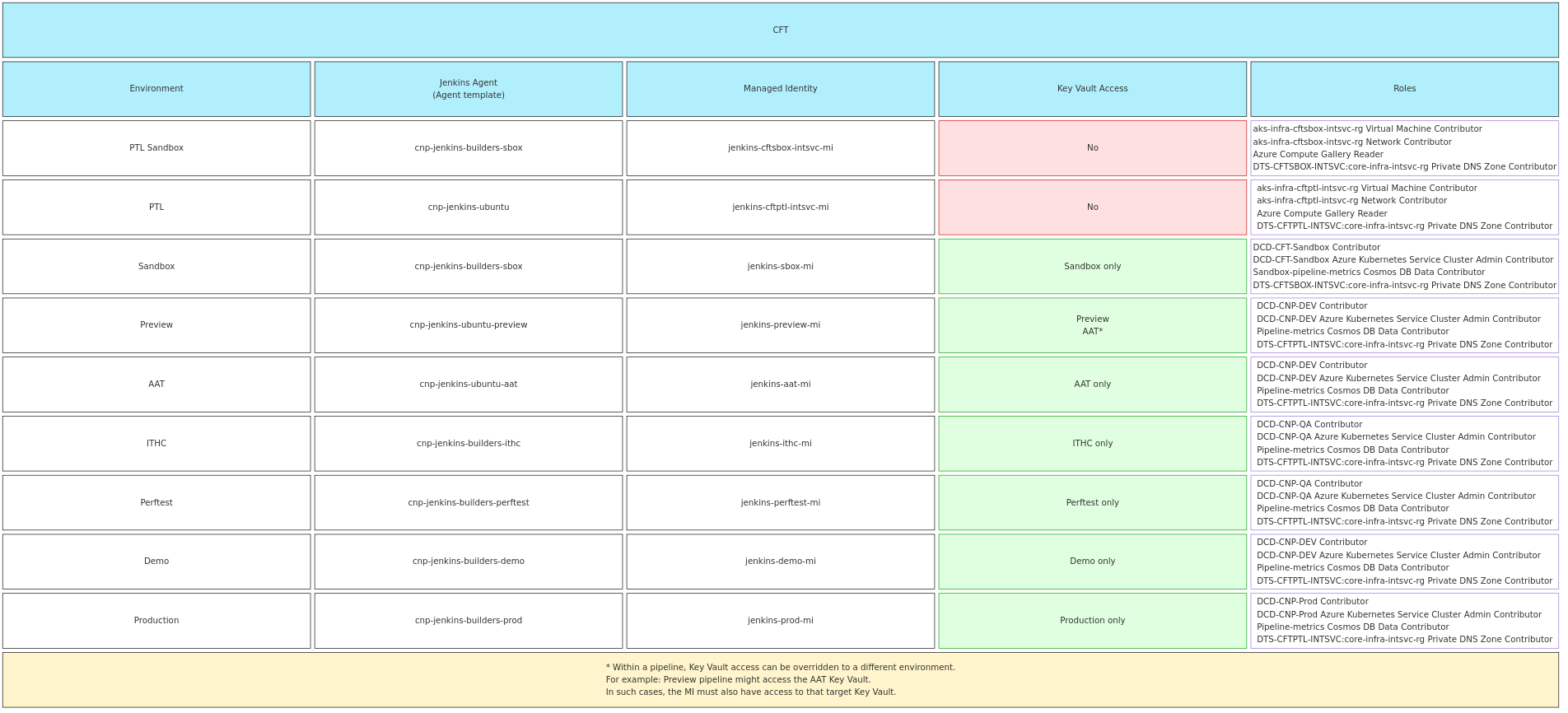
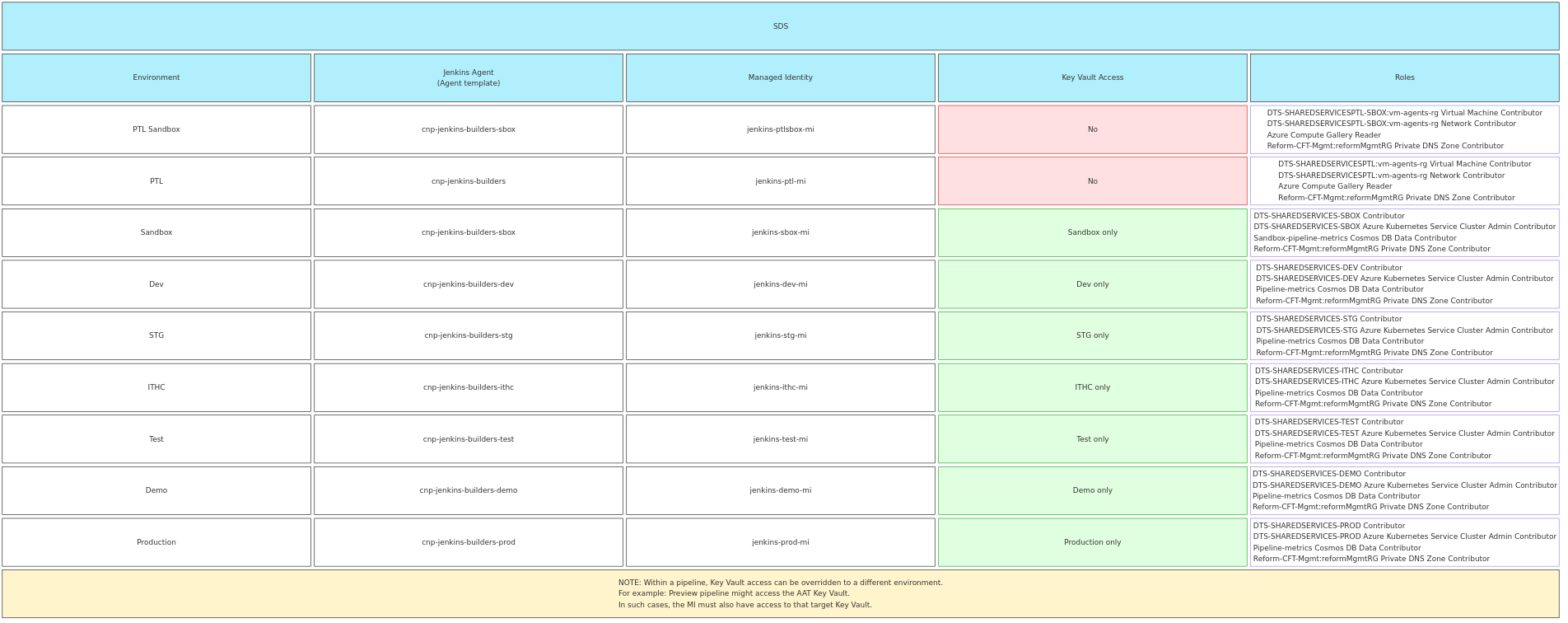
This was a security risk so now we have separate agent templates for each environment with different managed identities that only have access to the relevant environment.
Broad access on those legacy managed identities will be phased out.
Each identity has permissions to perform the necessary actions for the pipeline to work, such as:
- Pulling images from ACR
- Deploying to AKS
- Updating private DNS records
- Deploying terraform resources
- Publishing metrics to Cosmos DB (there are two Cosmos DBs - Sandbox and Prod)
When teams submit pull requests, Jenkins will spin up an agent to run the pipeline against the required environment.
Any terraform plan stages against prod in a pull request pipeline will use a prod agent to ensure the correct permissions are in place before switching back to the appropriate agent for the rest of the pipeline.
When the PR is merged and a pipeline is triggered for master, it will run on the appropriate agent for the target environment, i.e. AAT for AAT, PROD for PROD.
In environments such as Demo, ITHC and Perftest, a dedicated agent for each of those environments will be used as the pipelines only target a single environment.
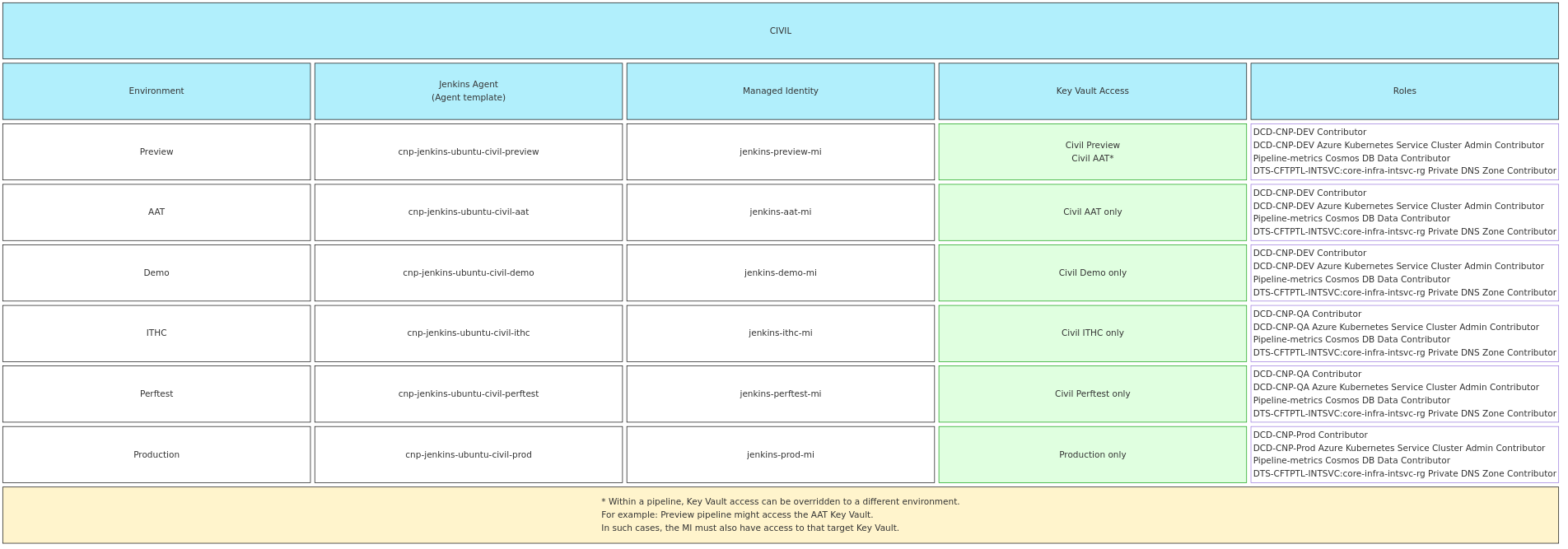
Civil team use their own agents but these are using the same MIs as the standard CFT agents.
Diagrams below show mappings between environments, Jenkins agents, MIs, Key Vaults and roles associated with the MIs:
- CFT Mappings
- SDS Mappings
- Civil Mappings
Creating managed identities
Managed identities are created in following repositories:
Based on configuration for each environment:
- CFT Jenkins Infrastructure / Jenkins Agent Identities
- SDS Jenkins Infrastructure / Jenkins Agent Identities
Example *.tfvars:
env                                  = "sbox"
subscription_id                      = "<subscription-id>"
private_dns_subscription_id          = "<priv-dns-subscription-id>"
private_dns_resource_group_name      = "<priv-dns-rg-name>"
managed_identity_name                = "jenkins-sbox-mi"
managed_identity_resource_group_name = "managed-identities-sbox-rg"
create_identity                      = true
cosmos_subscription_id               = "<sandbox-cosmos-db-sub-id>"
Nightly pipelines
Nightly pipelines do not require access to Azure except for publishing metrics to Cosmos DB so they will continue to use the PTL identity for authentication.
Key Vault access
Note: Key Vault access has already been configured for most active repositories and pipelines — see the list; additional access to overriden Key Vaults e.g.
Preview MI -> AAT KVis currently being rolled out. Any new pipelines must have KV access granted as described below.
Most Jenkins pipelines read secrets from a team’s Key Vault during execution, so each agent must have access to the relevant Key Vault in its target environment.
Within the pipeline config it is also possible to override the corresponding Key Vault environment to be accessed.
For example a Preview pipeline might be overriden to use AAT key vault.
In such case the corresponding Key Vault will need to additionally grant access to the source MI, this is currently the case for
jenkins-preview-mi which has Get and List Secret permission on a large number of AAT Key Vaults as listed below.
Click for a full list (as of 29th May 2026) of AAT KVs that grant access to jenkins-preview-mi
- adoption-aat - am-aat - bulk-scan-aat - ccpay-aat - civil-cui-aat - cmc-aat - disposer-aat - div-aat - draft-store-aat - em-icp-aat - enforcement-aat - et-aat - et-cos-aat - ethos-shared-aat - fact-aat - fact-kv-aat - fees-register-aat - finrem-aat - fis-kv-aat - fpl-aat - hmc-aat - ia-aat - idam-idam-aat - lau-aat - nfdiv-aat - pcq-aat - pcs-aat - plumsi-aat - prl-aat - probate-aat - pt-kv-aat - rd-aat - reform-scan-aat - rpa-aat - rpe-send-letter-aat - rpx-aat - sptribs-aat - sscs-aat - wa-aatIf a team manages their Key Vault using cnp-module-key-vault, access can be granted by looking up the appropriate Jenkins managed identity and passing its principal ID to the module.
Example:
data "azurerm_user_assigned_identity" "jenkins" {
  name                = "jenkins-${var.env}-mi"
  resource_group_name = "managed-identities-${var.env}-rg"
}

module "example-vault" {
  source                  = "git@github.com:hmcts/cnp-module-key-vault?ref=master"
  name                    = "example-${var.env}"
  product                 = var.product
  env                     = var.env
  tenant_id               = var.tenant_id
  object_id               = var.jenkins_AAD_objectId
  jenkins_object_id       = data.azurerm_user_assigned_identity.jenkins.principal_id
  resource_group_name     = azurerm_resource_group.rg.name
  product_group_object_id = "<object-id>"
  common_tags             = local.tags
  create_managed_identity = true
}
Pipeline runtime
If an agent is not available when a pipeline is triggered, Jenkins will queue the pipeline until an agent becomes available.
Usually this takes less than a minute but it may take longer if there are a lot of pipelines in the queue.
If the queue is growing without pipelines being picked up, it may indicate an issue with the Jenkins agents and should be investigated.
Look at the log files under Manage Jenkins > System Log > Azure VM Agent (Auto) for any errors related to the agents.
The log is not configured by default to reduce log volumes but you can add the appropriate loggers as needed:
- com.microsoft.azure.vmagent
- com.microsoft.azure.vmagent.AzureVMAgent
Further troubleshooting steps can be found in the builds starting slowly runbook.
For more information about the stages in the pipeline, refer to The HMCTS Way