Jenkins setup
Use this page when adding a GitHub repository to Jenkins.
For team-level Jenkins metadata and build dashboards, use Jenkins.
To find out more about the common pipeline, see its documentation.
There are Jenkins servers for both CFT (Civil, Family & Tribunal) and SDS (Shared Digital Services).
The setup depends on the business area your application is in.
Before starting, make sure the repository exists and access is managed through the correct GitHub teams.
See GitHub and creating a GitHub repository.
Add the GitHub topic
Add the required GitHub topic to the repository so it appears in the Jenkins organisation scan.
Add the repository to the Jenkins allowlist
Raise a pull request to add your repository to the Jenkins allowlist.
Only repositories present in this file will be picked up by the Jenkins org scan.
CFT: hmcts/cnp-jenkins-config/deployment-controls.yml
SDS: hmcts/sds-jenkins-config/deployment-controls.yml
Add an entry in the following format:
- repo: https://github.com/hmcts/<your-repo-name>.git
  deployment-enabled: true
Scan Jenkins
Scan the organisation manually in Jenkins if it does not scan automatically.
Allow production deployments
Production deployment approval is a Path to Live concern. See production approval once you are ready to go live.
Pipeline stages and deployment controls
The diagram below illustrates which pipeline stages are available depending on your deployment-enabled setting in deployment-controls.yml:
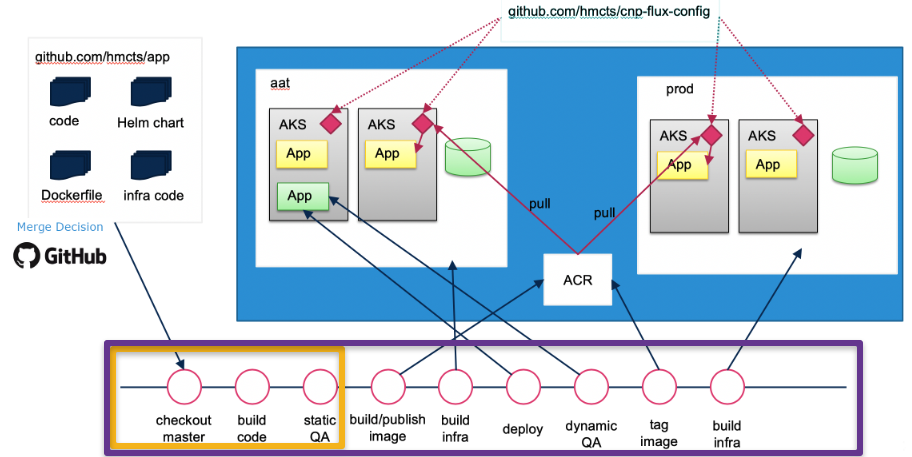
- Orange box: stages available when your repository is in
deployment-controls.ymlbutdeployment-enabledis not set totrue:checkout master,build code,static QA - Purple box: all stages available when
deployment-enabled: trueis set, including build, deploy, test, tag and production infrastructure stages
Without deployment-enabled: true, no Docker images will be published, no infrastructure will be applied, and no deployments to AKS will occur.
GitHub topics
Jenkins looks for repositories by searching for GitHub topics.
The topics are named after the Jenkins instance the repository will be built on. CFT repositories are split alphabetically across multiple topics.
For example, if your repository starts with div, d is in the CFT jenkins-cft-d-i topic.
See the GitHub documentation on how to add a topic.
CFT topics
jenkins-cft-a-cjenkins-cft-d-ijenkins-cft-j-z
SDS topics
SDS repositories are not currently split, but they may be in the future.
jenkins-sds
Next step in Creating a New Component: Configure GitOps with Flux