Azure DevOps
CJS Common Platform has its own Azure DevOps organisation under hmcts-cpp and the pipelines live under their own cpp-apps project. This is completely separate to CNP Azure DevOps described in other parts of this documentation site.
Pipeline YAML and shared templates are source controlled, but service connections, variable groups, agent-pool permissions and access to secure files are managed in Azure DevOps.
Simply adding a pipeline YAML does not guarantee access - confirm the target subscription, service connection and required permissions with CPP DevOps / Platform Operations team before the first run.
You can see how CPP Azure DevOps is structured in comparison to CNP in the table below:
| Organisation | Project | ADO agent pools | Azure tenants used | Service connections | ADO pipeline library | Typical use cases |
|---|---|---|---|---|---|---|
| hmcts-cpp (CPP) | cpp-apps | Separate non-live and live self-hosted VMSS pools; a non-live AKS-backed pool also exists | Separate live and non-live tenants | Manually created and maintained; pipeline YAML only references them | cpp-azure-devops-templates | IaC management and application deployment, including AKS and VM delivery through Terraform, Ansible and Helmsman |
| hmcts (CNP) | PlatformOperations | Microsoft-hosted | Single tenant | Managed from azure-enterprise and scoped to individual subscriptions/environments | cnp-azuredevops-libraries | Mostly IaC management with Terraform |
Tenants, environments and deployment targets
Crime operates across separate Live and Non-live tenants. Applications can run on VMs or AKS clusters; VM delivery is service-specific and many established services use the AKS route.
Separate sets of credentials and VPN configurations are needed to access each environment (this includes AKS clusters) and obtaining credentials to the live tenant requires an SC clearance - consult the onboarding documentation for more details.
Typical delivery routes:
| Target | Method | Environment model |
|---|---|---|
| Virtual machine | Service-specific Terraform and Ansible pipelines | Delivery and operations are service-specific. Playbooks in cpp-automation-ansible and similar projects build a dynamic Azure inventory across all resource groups by default, or a selected list, then targets VMs using project, platform, tier, role, environment and stack tags. Tag values are component-specific, such as ccm_dev and devccm03; use the component release runbook for the supported target and release process. |
| AKS | cpp-aks-deploy, Helm and Helmsman | The pipeline supports dev, sit, ste, nft, prp, prd and prx. A deployment selects an environment and stack, such as devccm08; the active cluster is resolved at runtime and the namespace is derived from those values. |
For the shared template library, environment prefixes determine the live or non-live family, service connection, variable groups, Terraform backend and default VMSS agent pool.
Service Principal (spn) authentication requires both an Azure Resource Manager service connection and service-principal credential variable group.
Workflow Identity (wif) uses the service connection without that credential group.
As described earlier - both types are currently manually managed.
Using CPP Azure DevOps templates
The shared library offers many reusable templates, the main ones are in these areas:
| Template area | Use it for | Example template |
|---|---|---|
| Context resolver | Deriving the environment family, service connection, variable groups, Terraform backend and default agent pool. | resolve-context.yml |
| Terraform dispatcher | Standard Terraform plan, apply and destroy pipelines using spn or wif authentication. |
terraform-dispatcher.yml |
| Build and validation | Established Java, UI and container build, quality and validation workflows. | context-validation.yaml |
| Ansible | VM and environment operations such as start-up and shutdown. | start_env_stack.yaml |
Creating new pipeline
When creating a new pipeline, start by looking at a comparable CPP pipeline definition (e.g. azure-pipelines.yaml) and use the same templates as that pipeline uses (where applicable).
Do not recreate credential handling, environment mapping or deployment mechanics in a service repository unless the shared template cannot support the requirement.
Note:
cpp-azure-devops-templatesis a private repository, you will need to be logged in with your HMCTS GitHub account to access it.
For more details consult cpp-azure-devops-templates Readme.
In order to begin using these templates in your pipeline simply define it as a resource:
resources:
  repositories:
  - repository: cppAzureDevOpsTemplates
    type: github
    name: hmcts/cpp-azure-devops-templates
    ref: 'main'
    endpoint: 'hmcts'
This library does not currently offer tagged releases and consuming pipelines reference its main branch.
Once you have defined the library as a resource, use the context resolver and Terraform dispatcher as shown below:
parameters:
- name: environment
  type: string
  default: dev

variables:
- template: templates/context/resolve-context.yml@cppAzureDevOpsTemplates
  parameters:
    environment: ${{ parameters.environment }}
    authMode: spn
    agentClass: vmss

stages:
- stage: precommit
  jobs:
    - job: precommit
      steps:
      - template: templates/context/validate-context-step.yml@cppAzureDevOpsTemplates
- template: templates/context/terraform-dispatcher.yml@cppAzureDevOpsTemplates
  parameters:
    operation: apply
    authMode: ${{ variables.authMode }}
    vaultAdminCredentialsVarGroup: ${{ variables.vaultAdminCredentialsVarGroup }}
    spnCredentialsVarGroup: ${{ variables.spnCredentialsVarGroup }}
    azureServiceConnection: ${{ variables.azureServiceConnection }}
    agentPool: ${{ variables.agentPool }}
    platform: ${{ variables.platform }}
    environment: ${{ variables.environment }}
Manual Terraform approval gates
Unlike in CNP, within Crime currently there is no functionality to post the planned Terraform changes as comments onto your PR so you should always review the Terraform plan within your pipeline before merging.
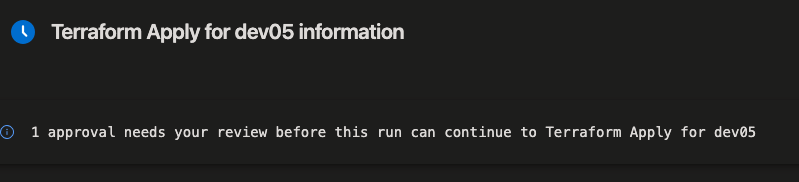
However, Terraform plan and apply target separate Azure DevOps Environments which have been specifically configured to require manual approval within the ADO interface before they can execute.
This ensures you have time to review the plan and catch any undesired changes before applying the plan, even if you have already merged your code.
ADO agent pools
Agent pools provide the execution environment for a pipeline; they are not deployment targets. Select a pool with the network access and agent capability required by the job.
| Environment family | Pool name | Type | OS |
|---|---|---|---|
| All Non-Live environments | ubuntu-ado-agents-mdv |
Virtual Machine Scale Set pool | Ubuntu 24.04 |
| NFT | ubuntu-ado-agents-nft |
Virtual Machine Scale Set pool | Ubuntu 24.04 |
| All Live environments | ubuntu-ado-agents-mpd |
Virtual Machine Scale Set pool | Ubuntu 24.04 |
| All Non-live clusters | MDV-ADO-AGENT-AKS-01 |
AKS based | Ubuntu 24.04 |
| All Live clusters | There is currently no Live AKS pool | - | - |
Configuring pools
You can configure the pool to be used like this:
# set VMSS for individual stage:
stages:
  - stage: precommit
    pool:
      name: "ubuntu-ado-agents-mdv"
# set VMSS for entire pipeline
pool:
  name: "ubuntu-ado-agents-mdv"

# set AKS-based pool for entire pipeline
pool:
  name: "MDV-ADO-AGENT-AKS-01"
  demands:
    - identifier -equals ubuntu24-j17
If you need your pipeline to be able to deploy into both live and non-live environments (depending on what is selected) you can set agent pool conditionally:
variables:
- ${{ if eq(parameters.platform, 'nonlive') }}:
  - name: agentPool
    value: ubuntu-ado-agents-mdv
- ${{ else }}:
  - name: agentPool
    value: ubuntu-ado-agents-mpd
For AKS deployments, use the cpp-aks-deploy process in Tools and configuration. For artefact publishing and build-specific template guidance, see the CPP Artifactory CI/CD guide.