Onboarding
Welcome to the Crime Platform onboarding process. This guide will walk you through obtaining access to non-live and/or live tenants step by step.
Overview
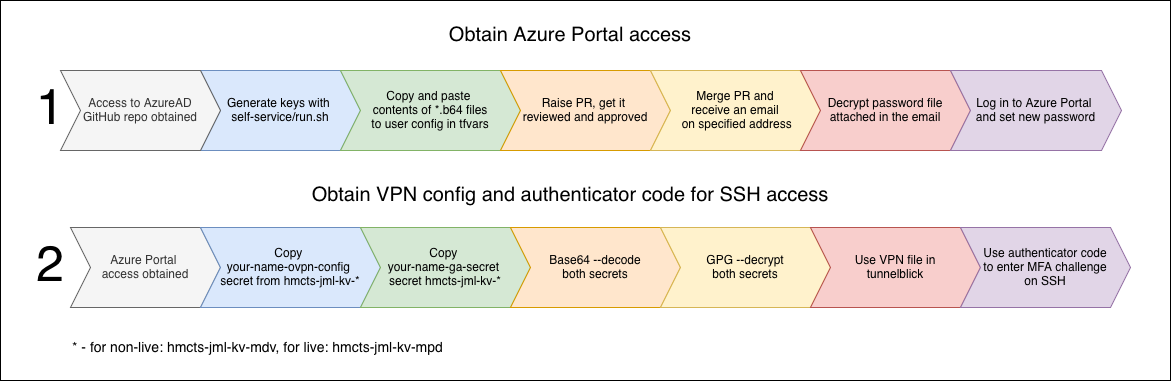
The onboarding journey consists of the following steps:
- Generate Key Pairs - Create your GPG and SSH keys
- Request Access - Submit a PR with your public keys
- Get Approved - Wait for Platform Operations team review
- Decrypt Credentials - Unlock your new Azure password
- Azure Portal - Log in and configure MFA
- Obtain Secrets - Retrieve and decrypt your VPN and Authenticator secrets
- Configure Authenticator - Add your Authenticator App
- Configure VPN - Set up your VPN connection
- Configure DNS - Set up your DNS configuration
- Configure SSH - Add SSH for platform access
Quick Reference Diagram
Before You Start
- Ensure you have access to HMCTS email
- Ensure you have access to HMCTS GitHub
Start with: Step 1: Generate Key Pairs
This page was last reviewed on 9 December 2025.
It needs to be reviewed again on 9 June 2026
by the page owner platops-build-notices
.
This page was set to be reviewed before 9 June 2026
by the page owner platops-build-notices.
This might mean the content is out of date.