Sections:
JI as-is database schema — diagrams
Schema diagrams reverse-engineered from JI Tables - 1.pdf (the Oracle DDL dump of the legacy JI APEX database).
Scope
- 46 production tables (
TBL_*) from the source PDF - 0 explicit foreign-key constraints — APEX pattern. All relationships in the diagrams are inferred from column-naming conventions and labelled by confidence
- 24 triggers — predominantly
BI_*(auto-PK from sequence) andBU_*(audit timestamp maintenance) - 26 indexes (non-PK)
- 6 production tables without declared PK — backfilled from unique
*_PKindexes where present - TMP_ staging tables excluded* by design — they're session-scoped, not part of the schema
Files in this folder
Diagrams
| File | What it shows |
|---|---|
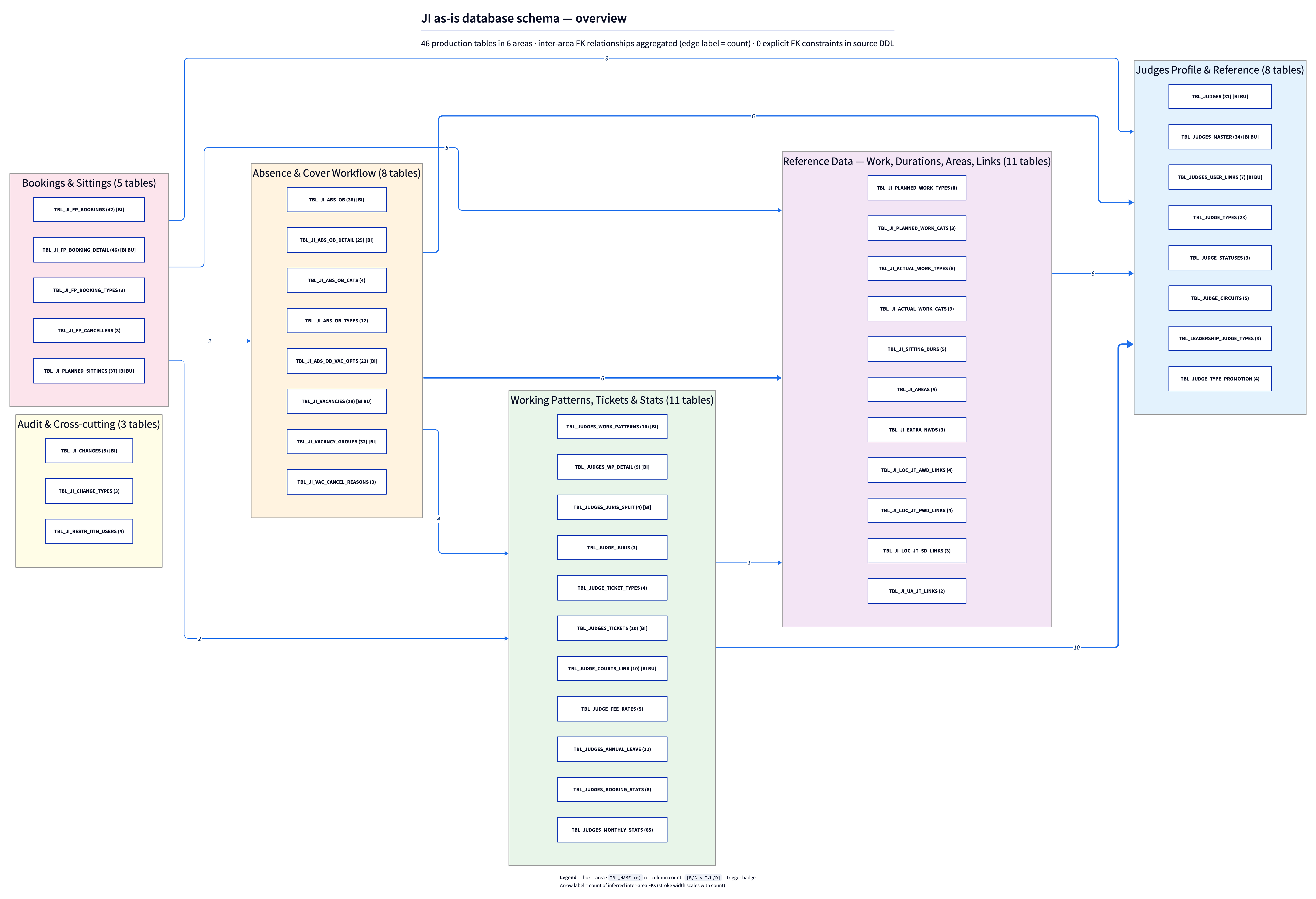
ji_schema_overview.png |
All 46 tables grouped into 6 colour-coded clusters; relationship lines visible; no columns |
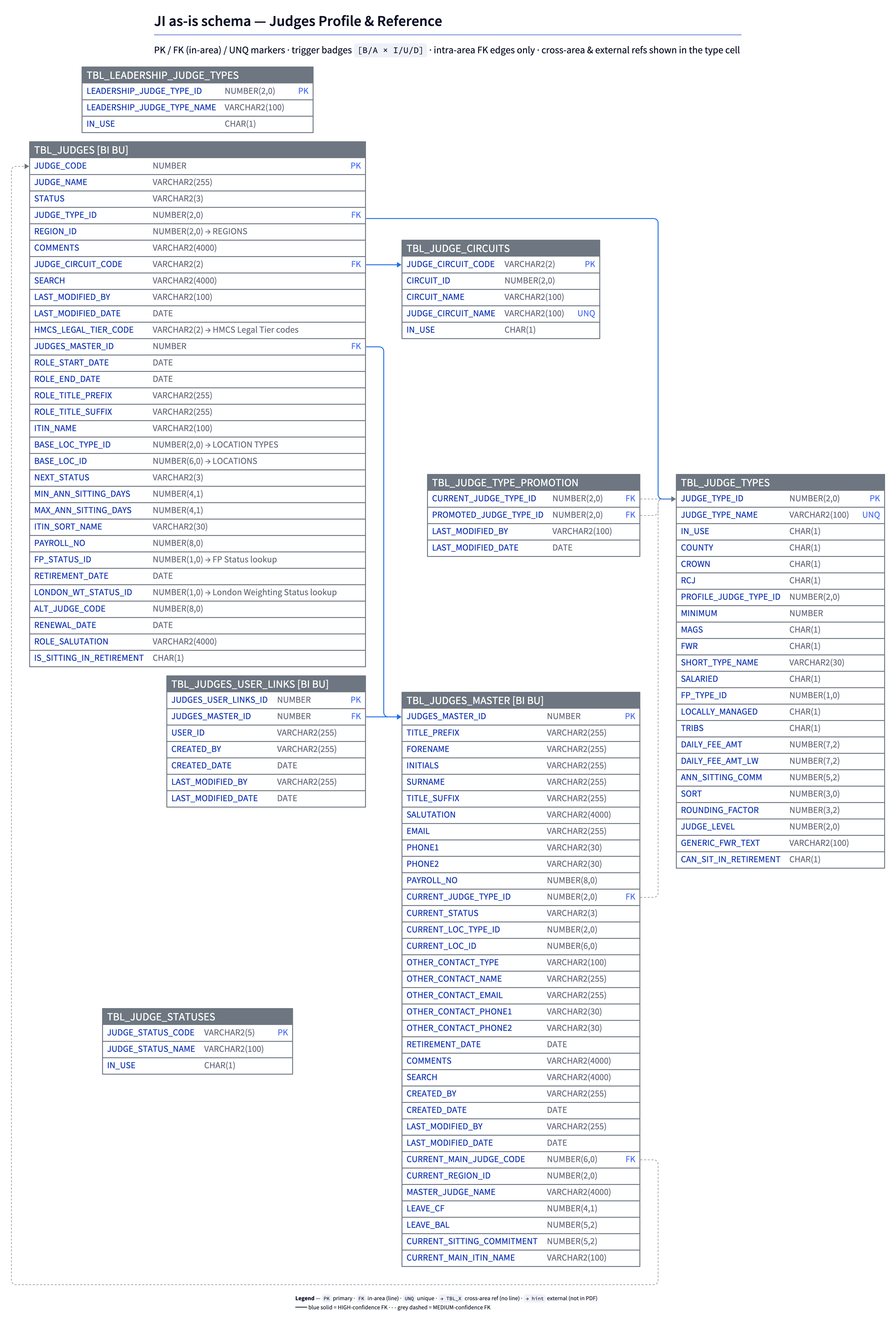
ji_schema_judges-profile.png |
Judges Profile & Reference (8 tables) — Judges, Master, User Links, Types, Statuses, Circuits, Leadership, Type Promotion |
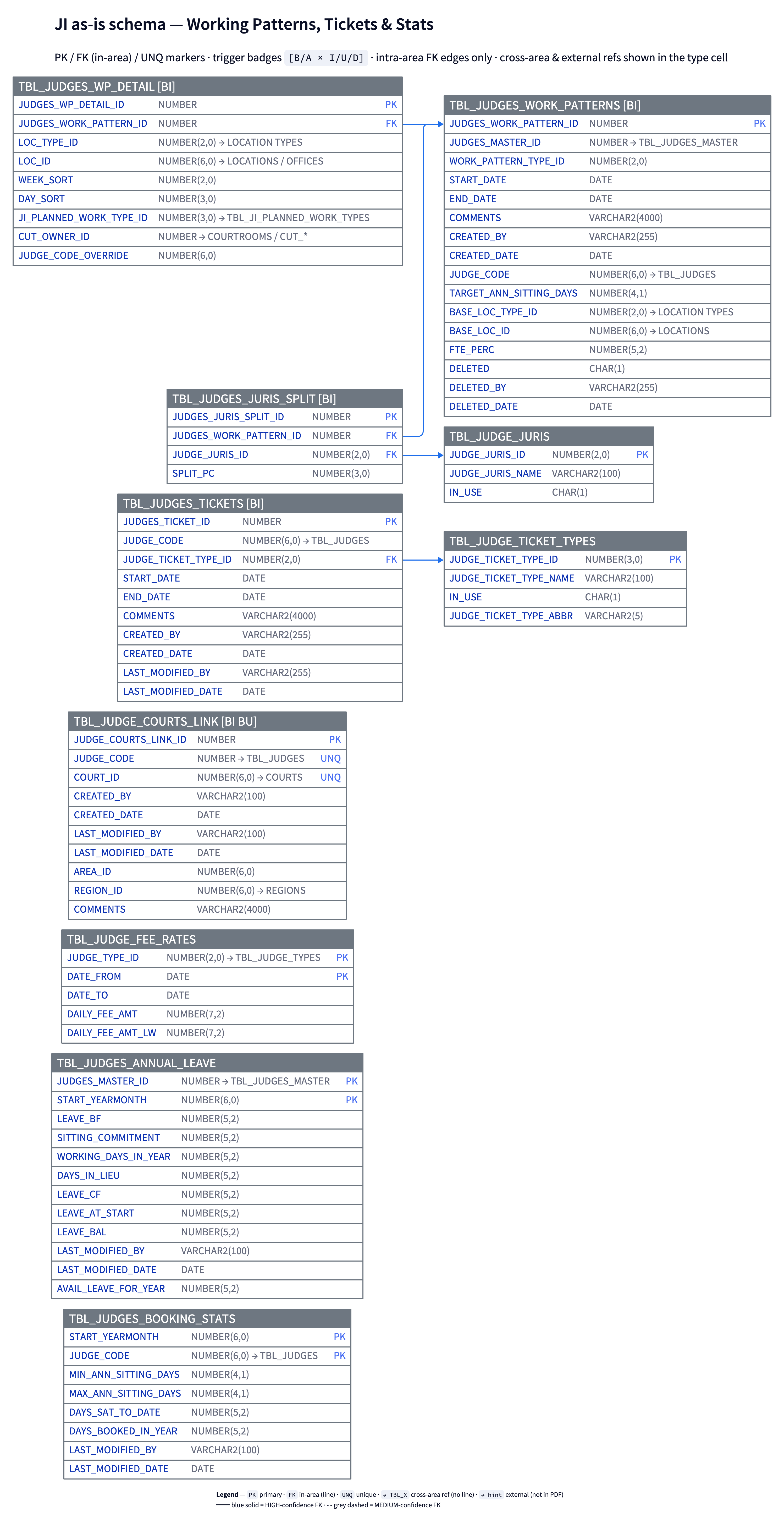
ji_schema_judges-patterns.png |
Working Patterns, Tickets & Stats (11 tables) — Work patterns, WP detail, Juris split, Tickets, Courts link, Fee rates, Annual leave, Booking/Monthly stats |
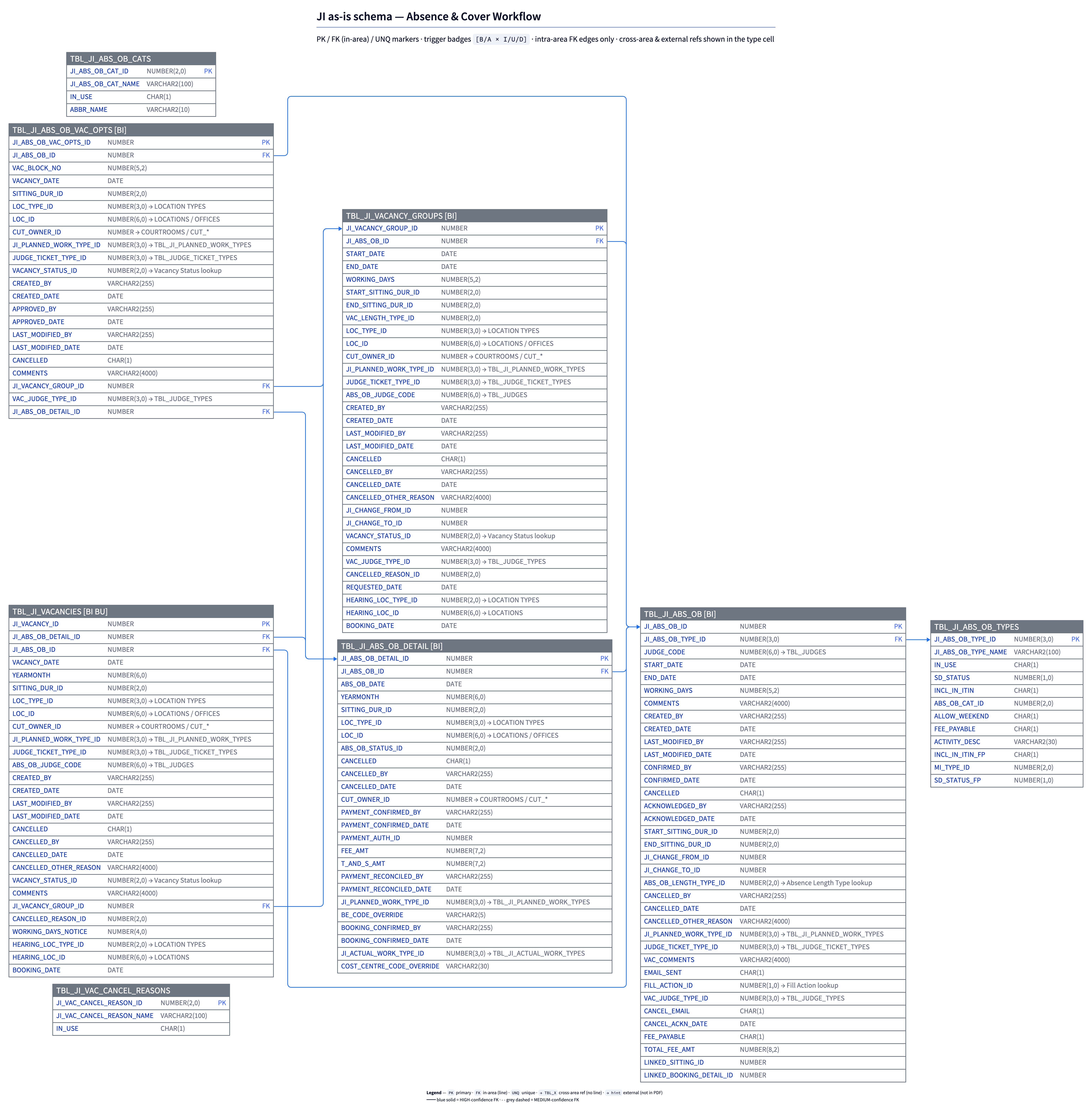
ji_schema_absence-cover.png |
Absence & Cover Workflow (8 tables) — ABS_OB family + Vacancies + Vacancy Groups + Cancel reasons |
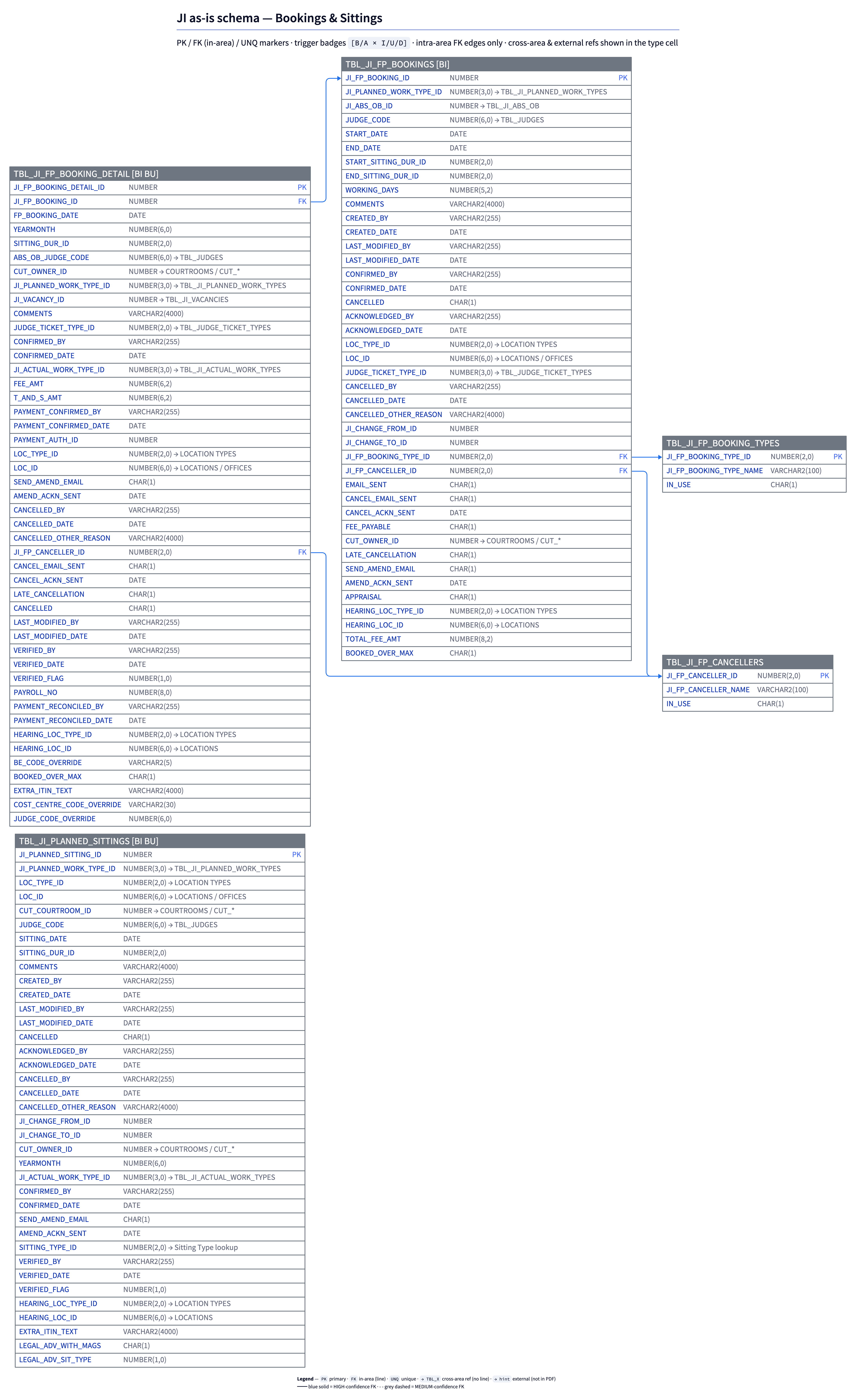
ji_schema_bookings-sittings.png |
Bookings & Sittings (5 tables) — FP bookings + detail + types + cancellers + Planned Sittings |
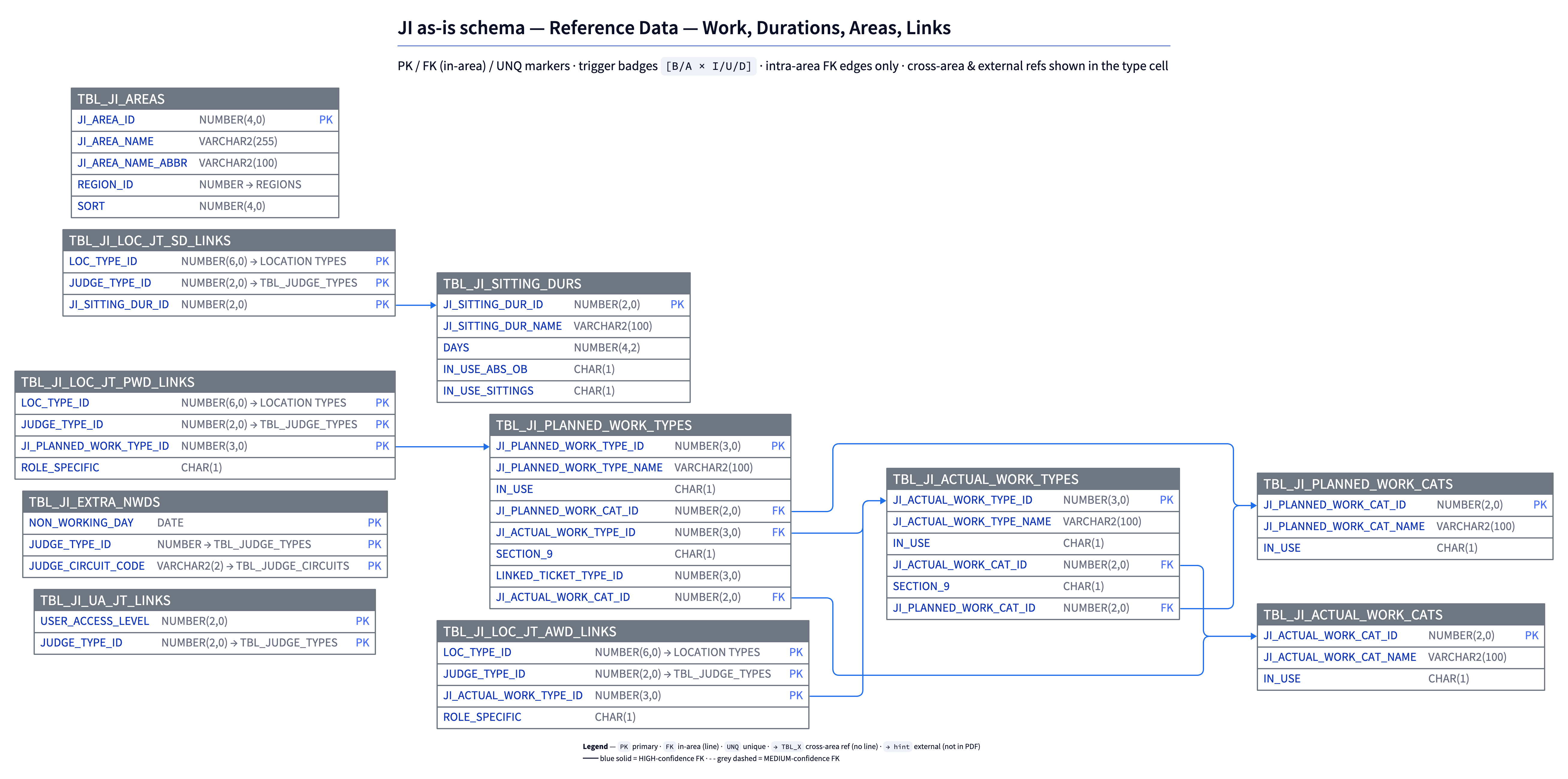
ji_schema_reference-work.png |
Reference Data (11 tables) — Planned/Actual work types and cats, Sitting durations, Areas, Extra NWDs, Loc-JT links, UA-JT links |
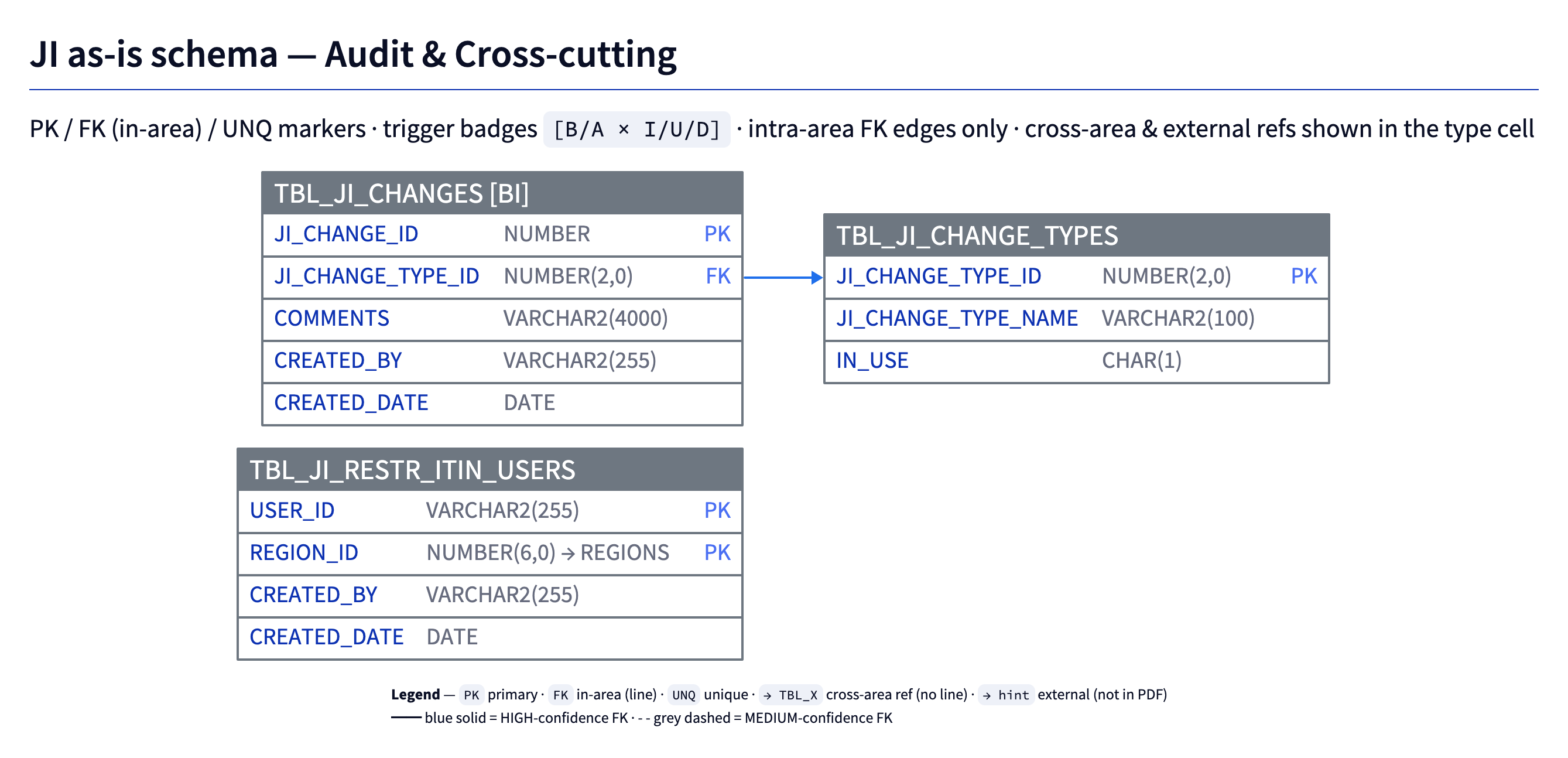
ji_schema_audit-cross-cutting.png |
Audit & Cross-cutting (3 tables) — Changes + Change Types + Restricted Itinerary Users |
Companion reference
| File | What it contains |
|---|---|
ji_schema_companion.md |
Full trigger bodies (all 24), external-reference inventory (columns pointing to tables not in this PDF), FK inference confidence rationale, and a complete table of every inferred FK with confidence label |
ji_schema.json |
Parsed structured data (tables, columns, PKs, indexes, triggers) — input for the diagram generator |
Source
| File | What it is |
|---|---|
JI Tables - 1.pdf |
Original Oracle DDL dump from APEX |
JI_Tables_1.txt |
Text extraction of the PDF (via pdftotext -layout) — input for the parser |
Build pipeline
| Script | Role |
|---|---|
scripts/python/parse_ji_ddl.py |
Parses JI_Tables_1.txt → ji_schema.json |
scripts/python/build_schema_diagram.py |
The schema model: loads JSON → backfills PKs → infers FKs → clusters tables. Run directly it writes ji_schema_companion.md. The D2 generator imports its functions, so the model lives in one place. |
scripts/python/build_schema_diagram_d2.py |
Imports the model above → generates D2 sources (.d2) → renders PNG via the ELK layout engine (orthogonal routing, minimised crossings) |
The diagrams ship as D2 (.d2) sources rendered to PNG. Each .d2 pins the layout engine in-file (vars.d2-config.layout-engine: elk), so it also renders correctly through the shared scripts/render_diagram.sh wrapper. Detail diagrams use D2's native sql_table ER shape.
Regenerate everything from scratch (requires brew install d2):
cd <repo-root>
python3 scripts/python/parse_ji_ddl.py
python3 scripts/python/build_schema_diagram.py      # companion markdown
python3 scripts/python/build_schema_diagram_d2.py   # diagrams (D2 + ELK)
How to read the diagrams
Overview (ji_schema_overview.png)
- Each box is an area cluster containing the list of its tables. Numbers in parentheses after each table name are column counts. Trigger badges
[BI BU…]appear after tables with triggers. - Arrows between boxes are inter-area aggregate FK relationships. The label is the count of inferred FKs crossing the area boundary; line weight scales with the count.
- No per-table edges. To see column-level FKs, open the relevant per-area detail PNG.
Detail diagrams (per area)
Every detail PNG includes a built-in legend. Each table is a D2 sql_table shape; ELK lays the tables out and routes the FK lines orthogonally to keep crossings to a minimum.
- Header bar:
TBL_NAME+ trigger badges (e.g.[BI BU]= before-insert + before-update). - Column rows list every column with its type and inline markers (shown on the right of the row).
- Column markers:
PK— primary keyFK— foreign key, target is in the same area (a line is drawn from this column to the target)UNQ— unique key (from a*_UKnamed index)- (NOT NULL is no longer shown on the diagram to reduce clutter — nullability is in
ji_schema.json.)
→ TBL_NAMEin the type cell — the column references a table in another area. No edge is drawn (open the named area's detail diagram, or the overview, to see the relationship visually).→ hintin the type cell (e.g.→ LOCATIONS / OFFICES) — the column references a table not in the source PDF. Seeji_schema_companion.mdfor the full external-reference inventory.- Edge styles (intra-area lines only):
- Solid blue — HIGH confidence FK (exact PK match)
- Dashed grey — MEDIUM confidence FK (prefixed PK match, e.g.
START_SITTING_DUR_ID→SITTING_DUR_ID)
Notable findings
TBL_JUDGESis the central hub — referenced by ~16 tables viaJUDGE_CODE. Sits in the Judges Profile cluster.- No explicit FK constraints anywhere — typical for APEX-managed schemas where referential integrity is enforced at the application layer. This means the database itself permits orphaned rows.
- Composite link tables in Reference Data (
TBL_JI_LOC_JT_*_LINKS) connect Location × Judge Type to Work / Sitting Duration controlled lists. - 6 tables ship without explicit PK in the DDL but do have unique
*_PKindexes that effectively serve as PKs:TBL_JUDGES,TBL_JUDGE_TYPES,TBL_JUDGE_CIRCUITS,TBL_JUDGE_COURTS_LINK, plus two that have neither PK nor*_PKindex:TBL_JUDGE_TYPE_PROMOTIONandTBL_JUDGES_MONTHLY_STATS. The latter two are flagged in the diagrams as "(no PK declared)". - External-reference columns account for 58 inferred relationships pointing to tables not in this PDF: locations (
LOC_ID,LOC_TYPE_ID,BASE_LOC_*,HEARING_LOC_*), regions (REGION_ID), courtrooms (CUT_*), courts (COURT_ID), and several status/lookup columns. See the companion markdown for the full list.
FK inference summary
| Confidence | Count | Visual |
|---|---|---|
| HIGH | 68 | solid blue line |
| MEDIUM | 11 | dashed grey line |
| EXTERNAL | 58 | dotted light-grey line (detail diagrams only) |
| Total inferred relationships | 137 |
Source: docs/architecture/asis/database/README.md