This document catalogues JI's functional modules — what each does, who uses it, and how the modules fit together:
- Module — a first-class part of the application's functional surface, with its own numbered detail section below.
- Sub-module / Cross-cutting — described in the source documents but presented under a parent module or in the closing Cross-cutting NFRs section.
The analysis is grounded only in the input documents listed under Source Documents. Each module's Status cell uses the closed vocabulary Implemented / Partial / Discovery required / Out of scope. Where a module produces or consumes data that is also catalogued in the sibling data-dependencies document, this catalogue links to it by name rather than restating the data flow.
At a Glance
The table below is a compact summary of every module described in this document. Each row corresponds to a numbered detail section under Modules; each detail section repeats the same compact summary in an Attribute / Detail table for ease of reference.
| # | Module | Primary Users | Purpose | Status |
|---|---|---|---|---|
| 1 | Home | All users | Landing page; nav; dashboard counts | Implemented |
| 2 | Manage Judges | RSU; Court | Maintain judges, working patterns, tickets | Implemented |
| 3 | Court Itinerary | RSU; Court; Judges | Monthly / annual office views | Implemented |
| 4 | Judge Itinerary | RSU; Court; Judges | Per-judge schedule + forward look | Implemented |
| 5 | Absences | RSU; Court; Judges | Record, approve, manage judicial absences | Implemented |
| 6 | Vacancies | RSU; Court | Capture cover requirements; advertise | Implemented |
| 7 | Fee-paid and Other Bookings | RSU | Allocate fee-paid judges to vacancies | Implemented |
| 8 | Payments | RSU; Finance | Generate JFEPS-compatible schedules | Implemented |
| 9 | Payment Reconciliation | RSU; Finance | Match payments back to bookings | Implemented |
| 10 | Sittings | RSU; Court | Confirm and verify salaried sittings | Implemented |
| 11 | Admin | Sys Admin; All | Password change; new-user requests | Implemented |
| 12 | Reports | MI; RSU; Leadership | Standard MI reports; Excel exports | Implemented |
Module overview
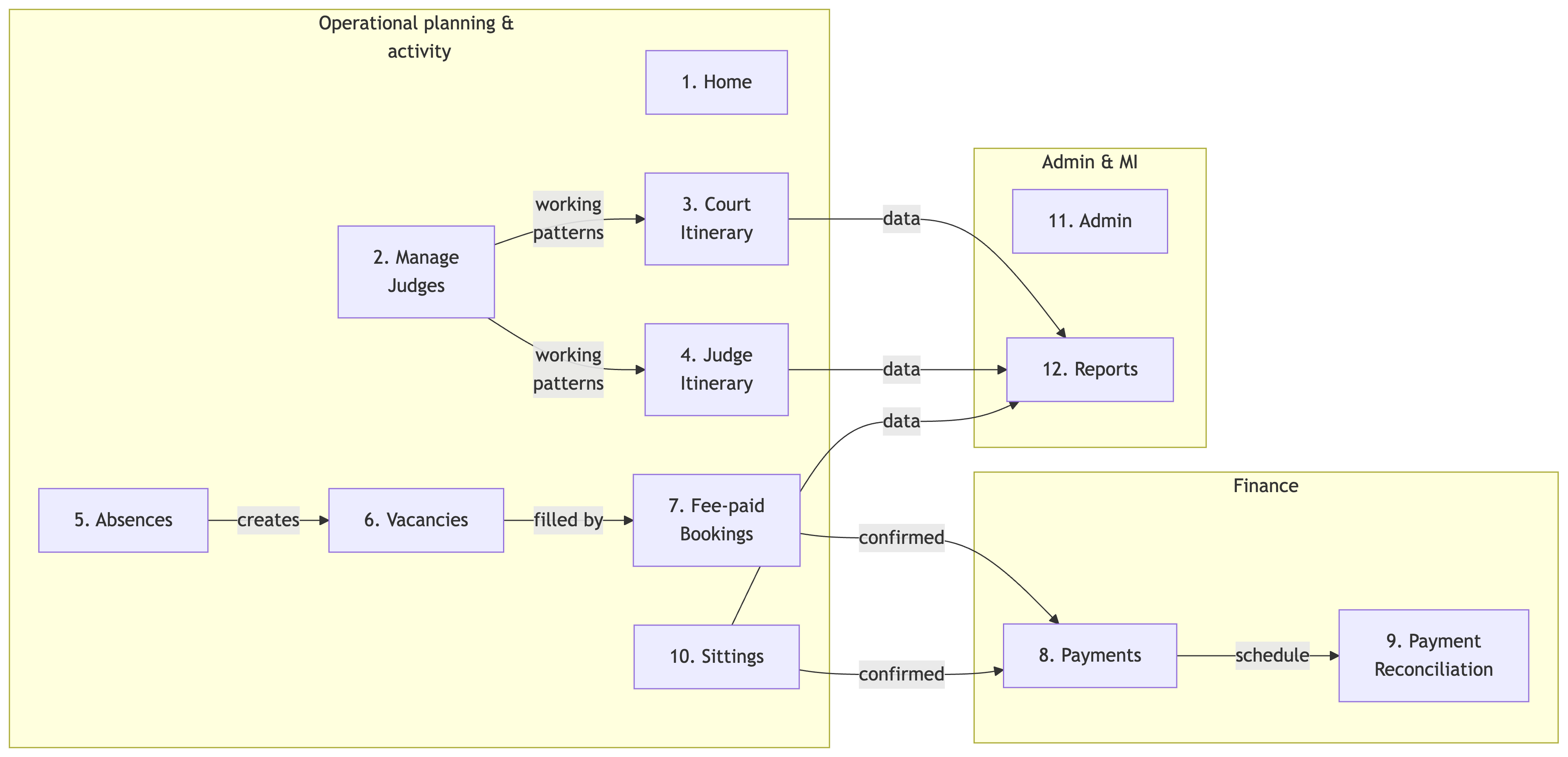
Modules
These are the first-class functional modules of JI. Each section below mirrors the row above in the At a Glance table and provides the full Capabilities list, Attribute / Detail summary and Sources for that module.
1. Home
The Home module is JI's landing page and navigation hub. It surfaces a top control panel, the main horizontal menu, dashboard summary tiles for the selected Region and Area, and a "How do I?" help panel that links into every other module.
Capabilities
- Render the top control panel (Change Password, Logout, Logged on as
) and breadcrumb trail - Provide horizontal navigation to all top-level modules (Home, Manage Judges, Court Itinerary, Judge Itinerary, Absences/Vacancies/Bookings, Sittings, Admin, Reports)
- Filter dashboard counts by Region (
P1_REGION) and Area (P1_AREA) - Display summary metrics for the selected scope: judges, absences, vacancies, fee-paid bookings, pending payments, payments made, unreconciled
- Refresh the dashboard counts when Region / Area change
- Surface quick "How do I?" guidance for the most common user tasks
| Attribute | Detail |
|---|---|
| Module ID | HOME |
| Primary users | All authenticated users (Judges, Judges' Clerks, RSU, Court, Finance, MI, Sys Admin) |
| Trigger / entry points | Default landing page on login; HMCTS / OPT logo click from any module |
| Inputs | Authenticated session (OPT / APEX); aggregated counts from every other module |
| Outputs | Navigation context (P1_REGION, P1_AREA); dashboard counts |
| Business rules | Counts are read-only and aggregate-only; no case data is exposed; Region / Area selections persist as context for downstream modules |
| Cross-module dependencies | Aggregates counts from Manage Judges, Absences, Vacancies, Fee-paid and Other Bookings, Payments, Payment Reconciliation |
| NFRs | HOME-NFR-01 (≤ 3 s static load); HOME-NFR-02 (≤ 5 s dashboard refresh); HOME-NFR-04 (HMCTS accessibility); HOME-NFR-05 (Region / Area sourced from controlled reference data) |
| Status | Implemented |
Key user actions
- WHEN a user selects a Region and Area on the Home page THEN the dashboard tiles refresh to show counts scoped to that selection.
- WHEN a user clicks a "How do I?" link THEN the system navigates to the relevant module with the same scope context preserved.
Sources: JI Functional and Non-Functional Requirements §4.1a (HOME-FR-01..10), §4.1b (HOME-NFR-01..06); Judicial Itineraries High Level Requirements (HLR-01..04); OPT JI Training Brief DRAFT 02 §3.4, §5.1.
2. Manage Judges
The Manage Judges module is JI's system of entry for judge profiles. RSU users maintain personal details, role-specific data, working patterns, jurisdictional split and tickets here; Court users have read-only access except for DJs in their own office.
Capabilities
- Search and filter judges by name, base location, location type and judge type
- Maintain judge profile (name, contact details, base office, judge type, active / inactive status)
- Record role-specific details per judge (payroll number, retirement date, name for itinerary, heading, fee-payment status, London weighting)
- Maintain ticket information per role (ticket type, start date)
- Define and update Working Patterns (None / Daily / Weekly), with target sit %, jurisdictional split and per-day work-type pattern
- Auto-populate the judge's itinerary up to the next 31st March from the working pattern, preserving prior absences
- Convert salaried judges between full-time and part-time and adjust mandatory sitting days
- Switch a judge's base location to another office in the same Region
- Maintain per-judge financial-year statistics (sitting vs non-sitting days; breakdown by work type)
- Link to judges managed by other offices (off-circuit / cross-Region) for booking purposes
| Attribute | Detail |
|---|---|
| Module ID | MJ |
| Primary users | RSU (Full Access; Admin); Court (Full Access for DJs; Enhanced CJ for Circuit Judges) |
| Trigger / entry points | "Manage Judges" top-level tab; deep-link from Judge Itinerary and Court Itinerary |
| Inputs | Judge identity / contact data manually copied from eLinks (see Data Dependencies — eLinks); contractual working arrangements manually copied from HR systems (see Data Dependencies — HR systems / Administrative records) |
| Outputs | Judge records consumed by every operational module (Court Itinerary, Judge Itinerary, Absences, Vacancies, Fee-paid Bookings, Sittings) and by Reports |
| Business rules | Working patterns auto-overwrite future sittings up to 31st March; existing absences are preserved on pattern change; base location can only be changed within a Region (cross-Region needs OPT Advice Point); jurisdictional split percentages must total 100%; only judicial-team users may amend tickets, even for DJs |
| Cross-module dependencies | Feeds Judge Itinerary, Court Itinerary; consumed by Vacancies for fee-paid matching; consumed by Fee-paid and Other Bookings for booking allocation |
| NFRs | MJ-NFR-01 (search ≤ 10 s for Region-level data); MJ-NFR-02 (only RSU may update); MJ-NFR-03 (auditable: user, timestamp, before/after); MJ-NFR-04 (jurisdictional-split totals validated); MJ-NFR-05 (keyboard / assistive-tech navigation) |
| Status | Implemented |
Key user actions
- WHEN an RSU user selects a judge from the filtered results THEN the system opens the judge's maintenance view with personal, role-specific and working-pattern tabs.
- WHEN an RSU user creates a new working pattern with a
Weeklytype THEN the system requires the start date to be a Monday and regenerates sittings up to 31st March, preserving any previously-recorded absences. - WHEN an RSU user adds a ticket without a start date or ticket type THEN the system rejects the save with a validation error.
Sources: JI Functional and Non-Functional Requirements §4.2a (MJ-FR-01..15), §4.2b (MJ-NFR-01..05), §5.1 (Assumption 2), §5.3.3 (Dependencies — HR systems); Judicial Itineraries High Level Requirements (HLR-05..08); OPT JI Training Brief DRAFT 02 §5.1–5.7.
3. Court Itinerary
The Court Itinerary module is the office-centric view: which judges are sitting at a given court, when fee-paid bookings are in place, where vacancies are open and which absences are not to be filled (NTBF). It supports both monthly and annual views over the same data set.
Capabilities
- Filter by Office (
P5_LOC_TYPE/P5_LOC), Financial Year (P5_FIN_YR), Month (P5_MTH) and override Week-of-Date (P5_WEEK_OF_DATE) - Multi-select view options (
P5_ITIN_SHOW) to control attributes shown — at minimum Vacancy Judge Type and Work Type - Render the monthly itinerary table with planned sittings, fee-paid bookings, vacancies and NTBF absences for each day and office
- Render the annual itinerary as a per-month summary, navigable down to monthly or detail views
- Make every itinerary cell clickable to open the relevant detail screen (Sittings, Absences, Vacancies, Fee-paid bookings)
- Support copy / export to Excel via the Select Report (Ctrl-C then Ctrl-V) pattern for both monthly and annual views
| Attribute | Detail |
|---|---|
| Module ID | CIT |
| Primary users | RSU (Full Access; Read-only / Verifier); Court (Full Access; Limited / Read-only); Presiding Judges and Clerks (read-only) |
| Trigger / entry points | "Court Itinerary" top-level tab; sub-menu "Annual Court Itinerary"; deep-links from Home dashboard tiles |
| Inputs | Sitting and booking data from Sittings and Fee-paid and Other Bookings; absence data from Absences; vacancy data from Vacancies; judge data from Manage Judges |
| Outputs | Read-only itinerary view; Excel-pasteable tabular data for offline analysis |
| Business rules | View is read-only — updates happen via the deep-linked detail screens with role-based access; valid Office and month must be selected before refresh; layout must remain readable when copied to Excel |
| Cross-module dependencies | Read-only consumer of Manage Judges, Absences, Vacancies, Fee-paid and Other Bookings, Sittings |
| NFRs | CIT-MON-NFR-01 (monthly refresh ≤ 10 s); CIT-ANN-NFR-01 (annual render ≤ 15 s); CIT-MON-NFR-02 (read-only with role-gated edit links); CIT-MON-NFR-04 / CIT-ANN-NFR-02 (Excel-readable layout); CIT-MON-NFR-06 (date validation) |
| Status | Implemented |
Key user actions
- WHEN a Court user selects an Office and Financial Year and clicks Refresh THEN the system displays the monthly itinerary populated with that office's sittings, bookings, vacancies and NTBF absences.
- WHEN a user clicks a vacancy cell in the itinerary THEN the system opens the Vacancies detail screen scoped to that record.
- WHEN a user uses Select Report (Ctrl-C / Ctrl-V) on the itinerary THEN the table is copied to the clipboard with column boundaries preserved for paste into Excel.
Sources: JI Functional and Non-Functional Requirements §4.3a–d (CIT-MON-FR-01..14, CIT-MON-NFR-01..06, CIT-ANN-FR-01..09, CIT-ANN-NFR-01..04); Judicial Itineraries High Level Requirements (HLR-09..11).
4. Judge Itinerary
The Judge Itinerary module is the judge-centric view of planned and confirmed time. It shows what each judge is scheduled to sit, where, and when — without case detail — and includes the Judges Forward Look sub-module for longer-horizon planning across multiple judges.
Capabilities
- Select Base office (
P8_LOC_TYPE/P8_LOC), date range and one or more judges - Render per-judge daily entries showing planned sittings and absences with work type
- Distinguish planned vs confirmed vs cancelled vs rejected sittings, based on outcomes from Sittings and Fee-paid and Other Bookings
- Make every sitting and absence cell clickable to open the underlying record for view / update
- Distinguish sitting and non-sitting days according to the configured working pattern and absence types
- Support export to Excel via the Select Report pattern, consistent with Court Itinerary
- Provide the Judges Forward Look sub-module — a longer-term, multi-judge view filterable by Region / Office and judge type / specific judges, with cells linking to the relevant detail or back to Judge Itinerary
| Attribute | Detail |
|---|---|
| Module ID | JIT (sub-module: JFL — Judges Forward Look) |
| Primary users | RSU (Full Access; Read-only / Verifier); Court (Full Access; Limited / Read-only); Judges and Judges' Clerks (own / managed itineraries only) |
| Trigger / entry points | "Judge Itinerary" top-level tab; sub-menu "Judges forward look (NB – can be slow to load)" |
| Inputs | Working patterns from Manage Judges; sittings from Sittings; bookings from Fee-paid and Other Bookings; absences from Absences |
| Outputs | Read-only itinerary view per judge; Excel-pasteable tabular data; emailed itinerary copies (HLR-15) |
| Business rules | No case identifiers exposed; users can only view itineraries for judges they are authorised to manage; Forward Look may be paged or filtered to limit horizon and judge subset |
| Cross-module dependencies | Read-only consumer of Manage Judges, Sittings, Fee-paid and Other Bookings, Absences |
| NFRs | JIT-NFR-01 (single-judge month ≤ 10 s); JIT-NFR-03 (role-gated visibility); JIT-NFR-05 (changes audited); JFL-NFR-01 (Forward Look targeted ≤ 30 s for a Region); JFL-NFR-02 (paging if dataset exceeds threshold) |
| Status | Implemented |
Key user actions
- WHEN a Judge logs in THEN the system renders only their own itinerary (and itineraries of judges they manage, where applicable).
- WHEN a user clicks an absence cell in the itinerary THEN the system opens the underlying Absences record for view or update.
- WHEN a user opens Judges forward look THEN the system warns that the page may be slow to load and applies the configured paging / horizon limits.
Sources: JI Functional and Non-Functional Requirements §4.4a–b (JIT-FR-01..11, JIT-NFR-01..05), §4.4c–d (JFL-FR-01..07, JFL-NFR-01..04); Judicial Itineraries High Level Requirements (HLR-12..15); OPT JI Training Brief DRAFT 02 §5.8.
5. Absences
The Absences module records and approves judicial unavailability — leave, sickness, training, official business — with type, date range and partial-day options. It is the upstream of vacancy creation: confirmed absences that need cover trigger vacancies; absences marked NTBF block availability without creating one.
Capabilities
- List existing absences filtered by Region / Office and judge or judge type, showing dates, type, status and NTBF flag
- Create absence records with start / end date, partial-day options (full / half) and an absence type from a controlled list
- Distinguish absences created by judicial teams (auto-confirmed) from those requested by Courts or judges (require confirmation)
- Mark absences as Not To Be Filled (NTBF) or needs fee-paid cover; route the latter into Vacancies
- Support an approval workflow (request → approve / reject / cancel) handled by RSU / court admins, with the option to send acknowledgement emails (disabled in training)
- Update affected itineraries automatically on confirmation; flag conflicts with scheduled sittings
- Allow viewing future and past absences for a judge, scoped by financial year
- Support extension of sickness absences (only) without creating a new record; for non-sickness extensions, create a new absence
| Attribute | Detail |
|---|---|
| Module ID | ABS |
| Primary users | RSU / Judicial Team (confirm / approve); Court (raise on behalf of judges); Judges (request own where permitted) |
| Trigger / entry points | "Absences, Vacancies and Bookings → Absences" sub-menu; deep-link from Outstanding Actions on Home; deep-link from Judge Itinerary and Court Itinerary |
| Inputs | Absence dates and types entered by Court / Judge / RSU; controlled absence-type list from configuration |
| Outputs | Approved absences feed Vacancies (when cover is needed) and update Judge Itinerary / Court Itinerary |
| Business rules | Court-raised absences require RSU confirmation; absences cannot be open-ended (would otherwise wipe judge sittings); extensions only available for sickness; date ranges must not overlap and end ≥ start; absence acknowledgement email is opt-in |
| Cross-module dependencies | Triggers Vacancies; displayed by Judge Itinerary and Court Itinerary; consumed by Reports |
| NFRs | ABS-NFR-01 (filter results ≤ 10 s); ABS-NFR-02 (only judicial-team roles confirm / amend); ABS-NFR-03 (auditable); ABS-NFR-04 (date validation); ABS-NFR-05 (UI clearly indicates confirmed / NTBF) |
| Status | Implemented |
Key user actions
- WHEN a Court user creates an absence on behalf of a judge with the Request fee-paid cover radio set THEN the system requires work type, ticket type and fee-paid judge type before sending the request to RSU for processing.
- WHEN an RSU user approves an absence with cover required THEN the system creates a vacancy automatically and lists it on the Vacancies page.
- WHEN a sickness absence is extended THEN only the date is updated and prior sittings remain absent for the new range; non-sickness extensions require a new absence record.
Sources: JI Functional and Non-Functional Requirements §4.5a (ABS-FR-01..10), §4.5b (ABS-NFR-01..05); Judicial Itineraries High Level Requirements (HLR-16..19); OPT JI Training Brief DRAFT 02 §5.10–5.12.
6. Vacancies
The Vacancies module captures the requirement for fee-paid cover, either as a consequence of an approved absence or as a standalone capacity request. Vacancies are the inputs to the Fee-paid and Other Bookings workflow.
Capabilities
- List vacancies filtered by Region / Office, showing court, week or date, judge type required and status
- Create vacancies — automatically from an approved absence or manually as standalone
- Capture office, dates / week, judge type required, work type, ticket type and notes
- Edit vacancy daily breakdown — cancel individual days with a reason; extend or shorten the period
- Mark vacancies as filled by linking to a fee-paid booking
- Provide quick links to Vacancies by week for County Courts (DDJs) and Vacancies by week for Crown Courts (Recorders) periodic reports
- Cancel or close vacancies (e.g. when an absence becomes NTBF)
- Surface fee-paid judges matching the vacancy's filter as a hint for advertising (advertising itself is not automated — judicial teams use their own mailing lists)
| Attribute | Detail |
|---|---|
| Module ID | VAC |
| Primary users | RSU / Judicial Team (create, advertise, link); Court (Full Access — request / standalone vacancies for own office) |
| Trigger / entry points | "Absences, Vacancies and Bookings → Vacancies" sub-menu; auto-creation from confirmed Absences needing cover |
| Inputs | Confirmed absences from Absences; manual standalone vacancy parameters |
| Outputs | Vacancy records consumed by Fee-paid and Other Bookings; Excel exports for external advertising |
| Business rules | A vacancy can be filled only once unless explicitly configured otherwise (VAC-NFR-03); vacancy days cannot be cancelled once a booking is made; standalone vacancies are discouraged when a linked-to-absence pattern is available; vacancy advertising is manual and out-of-system |
| Cross-module dependencies | Consumed by Fee-paid and Other Bookings; displayed by Court Itinerary; fed by Absences; reported in Reports |
| NFRs | VAC-NFR-01 (list refresh ≤ 10 s); VAC-NFR-02 (only authorised users create / close); VAC-NFR-03 (no over-allocation); VAC-NFR-04 (export-friendly format) |
| Status | Implemented |
Key user actions
- WHEN an RSU user processes a confirmed absence with Create Vacancy THEN the system creates the vacancy with work type, ticket and judge type captured, and lists it on the Vacancies page ready for advertising.
- WHEN an RSU user edits a multi-day vacancy and cancels two of the days THEN the vacancy period shortens accordingly, requiring a reason for each cancelled day.
- WHEN a fee-paid booking is recorded against a vacancy THEN the vacancy displays its linked booking reference and is excluded from further booking selections.
Sources: JI Functional and Non-Functional Requirements §4.6a (VAC-FR-01..09), §4.6b (VAC-NFR-01..04); Judicial Itineraries High Level Requirements (HLR-20..22); OPT JI Training Brief DRAFT 02 §6.1–6.4.
7. Fee-paid and Other Bookings
The Fee-paid and Other Bookings module records sessions that fee-paid judges (Recorders, DDJs, deputies) sit, either to cover a vacancy or to provide additional capacity. It is the upstream of the Payments workflow — confirmed bookings are what get paid.
Capabilities
- List bookings filtered by Region / Office, judge type and date range
- Create bookings (linked to a vacancy or standalone) capturing judge, court, date, session, booking type and work type
- Support booking sessions: full-day, half-day (AM / PM), evening, reserved matter (¼-day)
- Track booking status (planned, provisional, confirmed, cancelled, rejected) with reason capture for cancellation
- Link bookings to underlying vacancies and / or absences for context
- Send acknowledgement email to the booked judge (overnight or immediate via Create Booking(s) and email now)
- Surface fee-payment flag (Y / N) per booking — supports cases where salaried staff sit as Recorders without receiving a fee
- Allow viewing a fee-paid judge's future bookings via deep-link to Judge Itinerary
- Make confirmed bookings eligible for downstream payment processing (export to JFEPS / JFEBS)
| Attribute | Detail |
|---|---|
| Module ID | FPB |
| Primary users | RSU / Judicial Team (create, confirm); Court (confirm bookings post-sitting) |
| Trigger / entry points | "Absences, Vacancies and Bookings → Fee-paid and other bookings" sub-menu; deep-link from selected Vacancies |
| Inputs | Vacancy records from Vacancies; judge records from Manage Judges; fee-payment flag per judge / per booking |
| Outputs | Confirmed bookings consumed by Payments; booking acknowledgements emailed to judges; booking entries displayed in Court Itinerary and Judge Itinerary |
| Business rules | Fee-paid judges may not be double-booked for overlapping sessions (FPB-NFR-04); cancelled or rejected bookings are excluded from payment and utilisation counts; configured min / max sitting-day limits per fee-paid judge are tracked but not enforced today; Y / N fee flag is mandatory when judge is configured as Ask when booking |
| Cross-module dependencies | Consumes Vacancies, Manage Judges; feeds Payments; displayed by Court Itinerary, Judge Itinerary; fed into Reports |
| NFRs | FPB-NFR-01 (list refresh ≤ 10 s); FPB-NFR-02 (only authorised create / confirm / cancel); FPB-NFR-03 (auditable; user + timestamp); FPB-NFR-04 (no double-booking); FPB-NFR-05 (export status clear) |
| Status | Implemented |
Key user actions
- WHEN an RSU user selects vacancies and clicks Create Fee Paid Bookings for Selected Vacancies THEN the system opens the booking creation page with the selected fee-paid judge and ticket details displayed.
- WHEN a Court user confirms a booking after it has been sat THEN the system updates the booking status, captures the actual work type, and makes the booking eligible for payment.
- WHEN an RSU user creates a booking for a judge whose fee-payment status is Ask when booking THEN the system requires a Y / N answer before saving.
Sources: JI Functional and Non-Functional Requirements §4.7a (FPB-FR-01..10), §4.7b (FPB-NFR-01..05); Judicial Itineraries High Level Requirements (HLR-23..25); OPT JI Training Brief DRAFT 02 §6.5–6.7, §7.1, §9.1.
8. Payments
The Payments module derives the JFEPS-compatible payment schedule from confirmed fee-paid bookings and routes it to a Payment Authoriser by email. JI does not transmit directly to the finance system — the Authoriser reviews and forwards.
Capabilities
- List confirmed fee-paid bookings (and other bookings) eligible for payment, with judge, court, date, session, booking type, work type and payment status
- Filter by Region / Office, judge, date range, payment status (pending, requested, paid)
- Show counts for Pending payments and Payments made — consistent with the Home dashboard tiles
- Mark eligible bookings as payment requested, generating records for downstream financial processing
- Bulk-select bookings for batch payment requests
- Display whether a booking has been exported to JFEPS / JFEBS and the export date
- Generate the JFEPS-compatible Excel schedule and email it to a chosen Payment Authoriser for review and forwarding
- Navigate to Payment Reconciliation for further tracking
| Attribute | Detail |
|---|---|
| Module ID | PAY |
| Primary users | RSU / Judicial Team (run schedule); Finance / Payment Authoriser (receive, review, forward) |
| Trigger / entry points | "Absences, Vacancies and Bookings → Payments" sub-menu; deep-link from Home dashboard tiles |
| Inputs | Confirmed bookings from Fee-paid and Other Bookings and confirmed sittings from Sittings where applicable |
| Outputs | JFEPS-compatible Excel payment schedule; email to Payment Authoriser; payment requested records for Payment Reconciliation; see Data Dependencies — JFEPS / L!BERATA (Finance) |
| Business rules | Schedule cannot be produced until bookings are confirmed by Court (post-sitting); same booking cannot be double-submitted (PAY-NFR-04); Payment Authoriser must be available to forward — JI does not auto-send to finance; bank details remain in the finance system, never in JI (PAY-NFR-05) |
| Cross-module dependencies | Consumes Fee-paid and Other Bookings and Sittings; feeds Payment Reconciliation; writes to email transport (see Data Dependencies — HMCTS Email infrastructure) |
| NFRs | PAY-NFR-01 (list refresh / batch ≤ 15 s); PAY-NFR-02 (only payments admin may flag / update); PAY-NFR-03 (auditable); PAY-NFR-04 (no double submission); PAY-NFR-05 (no bank-detail exposure) |
| Status | Implemented |
Key user actions
- WHEN an RSU user selects bookings and clicks Process payments THEN the system displays the proposed payment schedule and prompts for an authoriser.
- WHEN an authoriser is selected and Send payment schedule for authorisation clicked THEN the system emails the Excel-format schedule to the authoriser's inbox; the authoriser then forwards it to L!BERATA out-of-system.
- WHEN the same booking is selected for payment a second time THEN the system rejects the request and prevents re-submission.
Sources: JI Functional and Non-Functional Requirements §4.8a (PAY-FR-01..09), §4.8b (PAY-NFR-01..05), §5.3.1 (Dependencies — JFEPS); Judicial Itineraries High Level Requirements (HLR-26..27, Integrations As-Is — Finance / Judicial Payments (JFEPS)); OPT JI Training Brief DRAFT 02 §8.1.
9. Payment Reconciliation
The Payment Reconciliation module is the return leg of the Payments flow: it shows which bookings have been paid by JFEPS / L!BERATA, which remain pending and where there are mismatches. Reconciliation status comes back from finance out-of-band and is flagged manually in JI.
Capabilities
- List payment requests generated from Payments with reconciliation status (pending, matched, queried)
- Filter by Region / Office, judge, date range and reconciliation status
- Show, per payment, the linked bookings, amount, payment-request date and reconciliation flag
- Allow authorised users to flag payments as reconciled once finance confirmation is received
- Capture reconciliation notes (mismatch reasons, manual adjustments)
- Support exporting reconciliation data (e.g. copy / paste to Excel) for audit and reporting
- Prevent re-request of a payment once fully reconciled (REC-FR-08)
| Attribute | Detail |
|---|---|
| Module ID | REC |
| Primary users | RSU / Judicial Team; Finance / Payment Authoriser |
| Trigger / entry points | "Absences, Vacancies and Bookings → Payment Reconciliation" sub-menu; deep-link from Payments; deep-link from Home Unreconciled tile |
| Inputs | Payment requested records from Payments; reconciliation feedback received from JFEPS / L!BERATA out-of-band (see Data Dependencies — JFEPS / L!BERATA (reconciliation)) |
| Outputs | Reconciled / queried flag per payment; Excel-pasteable audit data |
| Business rules | Once a payment is fully reconciled, it cannot be re-requested for the same booking; only finance / RSU roles may amend reconciliation status (REC-NFR-02); all reconciliation changes are auditable |
| Cross-module dependencies | Reads from Payments; receives status from external finance (out-of-band) |
| NFRs | REC-NFR-01 (queries ≤ 15 s); REC-NFR-02 (role-gated); REC-NFR-03 (auditable); REC-NFR-04 (sort / filter native to module) |
| Status | Implemented |
Key user actions
- WHEN finance confirmation arrives for a payment request THEN an authorised user flags the payment as reconciled and captures any adjustment notes.
- WHEN a user attempts to re-request payment for a fully reconciled booking THEN the system rejects the request.
Sources: JI Functional and Non-Functional Requirements §4.8c (REC-FR-01..08), §4.8d (REC-NFR-01..04); Judicial Itineraries High Level Requirements (HLR-28).
10. Sittings
The Sittings module records and confirms salaried-judge court sessions. Confirmed sittings are the basis for utilisation reporting (and, in County Courts, for the Sitting Days return) and contribute to fee-payment processing where part-time salaried staff sit as Recorders.
Capabilities
- Create and maintain sittings for salaried judges (court, date, duration, work type) — derived from working patterns or scheduled ad-hoc
- Filter sitting records by Region / Office, judge type, judge and date range
- Allow authorised users to confirm that a sitting actually took place; update outcomes (confirmed, cancelled, rejected) used downstream
- Set or update work type (planned / actual; e.g. Public Law Family, Civil) per sitting; supports detailed work-type changes that "remember" on confirmation
- Split a sitting into AM / PM / different work types within a single day
- Create ad-hoc sittings for salaried judges (including DJ(MC)s and Legal Advisers in County Courts) — County Court Sitting Days return is sourced from this module post-April
- Verify confirmed sittings (Verifier role only) — once verified, data publishes to OPT reports and cannot be amended without an RFC
- Provide links to sitting-analysis reports (e.g. Sitting analysis for CJs / DJs, Sittings by Court for CJs / DJs)
- Support copy / export of sitting data for reporting and analysis
| Attribute | Detail |
|---|---|
| Module ID | SIT |
| Primary users | RSU / Judicial Team; Court (Full Access — confirm); Verifier (Read-only / Verifier — verify) |
| Trigger / entry points | "Sittings" top-level tab; deep-link from Court Itinerary and Judge Itinerary |
| Inputs | Working patterns from Manage Judges; ad-hoc sitting data entered manually; previously-confirmed sittings for verification |
| Outputs | Confirmed sittings feed Payments (where applicable for fee-paid recorders) and Reports; verified sittings publish to OPT reports / Sitting Days return |
| Business rules | Only authorised roles may confirm or amend (SIT-NFR-02); verifiers cannot also confirm; once verified, data is read-only and changes need a Request for Change (RFC); confirmation should be progressive (day-by-day) rather than month-end (per Training Brief guidance) |
| Cross-module dependencies | Consumes Manage Judges (working patterns); feeds Payments; displayed by Court Itinerary, Judge Itinerary; fed into Reports |
| NFRs | SIT-NFR-01 (list / update ≤ 10 s); SIT-NFR-02 (role-gated confirmation); SIT-NFR-03 (auditable); SIT-NFR-04 (analysis ≤ 30 s; exportable) |
| Status | Implemented |
Key user actions
- WHEN a Court user confirms a salaried sitting THEN the system updates the work type, session type and confirmed status and includes the sitting in utilisation statistics.
- WHEN a Verifier verifies the previous month's data THEN the system publishes the data to OPT reports and prevents further edits without an RFC.
- WHEN a user splits a sitting from full-day to AM / PM with different work types THEN the system warns about overwriting the original sitting and updates the itinerary on confirmation.
Sources: JI Functional and Non-Functional Requirements §4.9a (SIT-FR-01..07), §4.9b (SIT-NFR-01..04); Judicial Itineraries High Level Requirements (HLR-29..31); OPT JI Training Brief DRAFT 02 §7.2–7.4.
11. Admin
The Admin module covers two narrowly-scoped self-service flows: changing the user's password (HMCTS-policy-compliant) and requesting creation of a new JI user. Higher-impact administrative actions (role changes, deactivation, configuration) are performed by System Administrators / OPT Support outside the user-facing screens.
Capabilities
- Change password — current + new + confirm new — enforced complexity rules per HMCTS policy
- Display success / error messages via standard APEX message regions; on error the password is not updated
- Optionally invalidate existing sessions on password change (per security policy)
- Open Request creation of new user APEX dialog populated with the requesting user's details
- Capture name, email / username, required role / profile, Region / Office and justification
- Create the user-creation request record for OPT support to process
- Confirm submission on screen; allow cancellation without submitting
| Attribute | Detail |
|---|---|
| Module ID | ADM |
| Primary users | All authenticated users (password change); RSU / Court (request new user); Sys Admin / OPT Support (process requests off-screen) |
| Trigger / entry points | "Admin" top-level tab; "Change Password" link in the top control panel |
| Inputs | Current and new password; new-user request fields manually entered |
| Outputs | Updated password hash (never logged in plain text — ADM-PW-NFR-02); new-user request record routed to OPT support |
| Business rules | Password complexity rules per HMCTS policy; password expires after 90 days (Training Brief §3.3); password values are never logged; only authenticated users can submit new-user requests |
| Cross-module dependencies | Authentication is cross-cutting — see Cross-cutting NFRs |
| NFRs | ADM-PW-NFR-01 (encrypted storage / transport per MoJ); ADM-PW-NFR-02 (auditable; never log password values); ADM-PW-NFR-03 (≤ 5 s under normal load); ADM-NU-NFR-01 (only authenticated users); ADM-NU-NFR-02 (auditable, who + when); ADM-NU-NFR-03 (dialog open / submit ≤ 5 s) |
| Status | Implemented |
Key user actions
- WHEN a user enters the wrong current password on the Change Password screen THEN the system rejects the change and displays an error without updating the password.
- WHEN an authenticated user submits Request creation of new user with the required fields THEN the system creates a request record for the OPT support team and confirms submission on-screen.
Sources: JI Functional and Non-Functional Requirements §4.10a (ADM-PW-FR-01..06, ADM-NU-FR-01..06), §4.10b (ADM-PW-NFR-01..03, ADM-NU-NFR-01..03); Judicial Itineraries High Level Requirements (HLR-32..33); OPT JI Training Brief DRAFT 02 §3.3.
12. Reports
The Reports module is the primary management-information surface for JI. It provides a defined set of standard reports based on itinerary, absence, vacancy, sitting and booking data only — never case-level detail — and supports parameterised filtering and Excel / PDF export for offline analysis.
Capabilities
- Provide a Basic reports page with a fixed set of standard reports — at minimum: weekly sitting-day projections, weekly vacancies, absence / official business analysis, vacancy analysis by court, confirmed sittings / bookings by judge, confirmed sittings / bookings by judge type and court, sitting / booking details by judge, judge utilisation (sitting vs absent)
- Surface report-specific extras via the Reports menu: Annual leave reduction by Judge & month (CJs / DJs), Booking analysis for DDJs / Recorders, Jurisdictional split (CJs / DJs), Sitting analysis (CJs / DJs), Sittings by Court (CJs / DJs), Summary Report by Court / Judge Type / Work Type, Vacancies by week for County Courts / Crown Courts
- Apply parameter filters appropriate to each report (Region / Office, judge type, date range, financial year, judge)
- Render report results as tabular browser output
- Support copy / export to Excel and PDF (via Select Report pattern)
- Aggregate from sittings, absences, bookings, vacancies and payments per the configured definitions; never expose case-level detail
| Attribute | Detail |
|---|---|
| Module ID | REP |
| Primary users | MI / Reporting users (run, export); RSU / Judicial Team (run / export within their region); Leadership (consume) |
| Trigger / entry points | "Reports" top-level tab; sub-menu links to specific report types |
| Inputs | Confirmed sittings from Sittings; bookings from Fee-paid and Other Bookings; absences from Absences; vacancies from Vacancies; payments from Payments; reference data from Manage Judges |
| Outputs | Tabular MI output; Excel / PDF exports consumed by DA&I and HMCTS leadership (see Data Dependencies — DA&I MI / Performance Reporting) |
| Business rules | Reports must not expose case-level information (REP-BR-NFR-03); judge-level detail visible only to authorised users; aggregated reports may have wider access; standard filters required per report type |
| Cross-module dependencies | Read-only consumer of Manage Judges, Court Itinerary, Judge Itinerary, Absences, Vacancies, Fee-paid and Other Bookings, Payments, Sittings |
| NFRs | REP-BR-NFR-01 (≤ 30 s for standard filters); REP-BR-NFR-02 (judge-level detail role-gated); REP-BR-NFR-03 (no case-level exposure); REP-BR-NFR-04 (UI consistency) |
| Status | Implemented |
Key user actions
- WHEN an MI user selects a report and applies filters (Region, judge type, date range) THEN the system renders the result and surfaces a copy-to-Excel link for offline analysis.
- WHEN a Court user runs Sittings by Court for their own office THEN the system returns the office-scoped result without exposing data from other Regions.
Sources: JI Functional and Non-Functional Requirements §4.11a (REP-BR-FR-01..06), §4.11b (REP-BR-NFR-01..04); Judicial Itineraries High Level Requirements (HLR-34..36).
Cross-cutting NFRs
These NFRs apply across every module, drawn from per-module NFR rows that recur across the source documents. Per-module tables list module-specific NFRs only; system-wide ones are hoisted here to keep each table tight.
- Authentication & session management — All modules require an authenticated JI session enforced by the OPT / Oracle APEX runtime; the APEX session-timeout plug-in handles idle timeout and warning messages; passwords expire after 90 days and follow MoJ complexity rules; password values are never logged.
- Audit logging — Every create, update and delete action across Manage Judges, Absences, Vacancies, Fee-paid and Other Bookings, Payments, Payment Reconciliation and Sittings is auditable with user, timestamp and before / after values.
- Role-based access — Twelve user roles are defined with module-by-module permissions (Judge, Judge's Clerk, Presiding Judge / Clerk, Regional Admin / RSU, Regional (Full Access), Regional (Verifier / Read-only), Court (Full Access), Court (Enhanced CJ), Court (Limited / Read-only), Finance / Payment Authoriser, MI / Reporting User, System Administrator / OPT Support); permissions are enforced per-module via NFR-02-style rules.
- Accessibility — All UI complies with HMCTS accessibility standards: keyboard navigation, ARIA labels for tabbed content, assistive-technology compatibility.
- Performance budgets — Page-level NFRs across modules target ≤ 5 s for dashboard refreshes, ≤ 10 s for typical list / filter operations, ≤ 15 s for batch / annual operations, ≤ 30 s for report and forward-look queries.
Sources: JI Functional and Non-Functional Requirements §3 (User Roles), §4.1b (HOME-NFR-04), §4.2b (MJ-NFR-02..05), §4.5b (ABS-NFR-02..03), §4.6b (VAC-NFR-02), §4.7b (FPB-NFR-02..03), §4.8b (PAY-NFR-02..03), §4.8d (REC-NFR-02..03), §4.9b (SIT-NFR-02..03), §4.10b (ADM-PW-NFR-01..02), §5.2 (Constraints — APEX session timeout); OPT JI Training Brief DRAFT 02 §3.3.
Summary
- All twelve catalogued modules are
Implementedin the as-is system; the document records noPartialmodules. Two areas are recorded asDiscovery required(Tribunal Support and Magistrates Management) and case-management integration isOut of scope— these are kept inmodule-enumeration.mdrather than the catalogue. - The most operationally critical end-to-end flow is Manage Judges → Absences → Vacancies → Fee-paid and Other Bookings → Sittings → Payments → Payment Reconciliation: working-pattern data enters at Manage Judges, propagates through absence cover into bookings, becomes confirmed sittings, drives the JFEPS payment schedule, and reconciles back into JI from the finance system.
- Reports and Court Itinerary are read-only crystallisations of the operational chain; Judge Itinerary is its judge-centric view; Home summarises the same data into dashboard tiles.
- The Forward Look sub-module under Judge Itinerary is the only documented sub-module in the catalogue; everything else maps to a single first-class module H3.
- Notable gaps: Tribunals and Magistrates are explicitly marked Discovery required; no system-to-system integration exists today between Payments and the external JFEPS / L!BERATA finance system — payment delivery is a human forwarding step.
Appendix
- Forward Look is presented as a sub-module of Judge Itinerary, not as its own H3, because the source documents place its FRs (
JFL-FR-01..07) under §4.4c–d of Judge Itinerary rather than as a standalone ribbon. Promoting it to its own H3 would inflate the catalogue without distinguishing it functionally. - Court Itinerary (Monthly) and Court Itinerary (Annual) are merged into one Court Itinerary H3 even though the FRD splits them into §4.3a–b and §4.3c–d. They share data, navigation, view options and the Select Report export pattern; treating them as one module keeps the catalogue aligned with how a user thinks of the ribbon.
- Tribunal Support, Magistrates Management and case-management integration are kept in
module-enumeration.mdonly. The first two are explicitly marked Discovery required in the source; the third is an integration, which belongs in the data-dependencies catalogue (where it is itself ruled out as "No direct integration is described"). - External systems (eLinks, JFEPS / L!BERATA, OPT / APEX, HMCTS Email, DA&I MI, HR systems) deliberately do not appear here; they live in
data-dependencies.md. Module entries link by name into that catalogue where relevant.
Source Documents
This analysis is based only on the following documents in ji-input-docs/ (top-level files; subfolders not consulted):
High level Capabilities JI.docxJI Functional and Non Functional Requirements.docxJudicial Itineraries High Level Requirements.docxJudicial Itineraries Requirement_597aaee38d4f4a7fabdae2249026f55d-290426-1019-36.pdfJudicial Itinerary KB.docxOPT JI Training Brief DRAFT 02.doc
Plain-text extractions of these documents were produced alongside the input folder at ji-input-docs/output-functional-modules/extracted-text/ and used as the basis of analysis without loading the binary documents into memory.
Source: docs/architecture/asis/functional-modules.md